Restaurant Rookie
LEGO Education Computer Science & AI
Restaurant Rookie
The new robot server doesn’t know where to go, what to do, or how to deliver food. Today you’re the robot trainer.
What You Will Learn
Every computer system takes in information, does something with it, and produces a result. Information that goes into a system is an input. Information or actions that come out of a system are an output. A sequence is a set of steps arranged in a specific order, and when the order changes, the result changes too.
In this lesson, the input is a color shown to a color sensor, and the output is the movement of a motor. You will put those inputs in order to build a sequence that controls a robot.
In the real world
When a server taps your order into a tablet, that tap is an input, and the order showing up on the kitchen screen is an output. Robot servers in real restaurants work the same way: sensors collect information, and motors respond.
Today you will:
- Use color inputs to a color sensor to control the outputs of a motor.
- Explain how inputs and outputs are related in a computing device.
- Create, test, and refine a sequence that moves a robot server from the kitchen to a table and back.
Background
Imagine you walk into a restaurant, and instead of a person bringing food to your table, a robot does it. Here’s the problem: this robot is brand new. It’s a rookie, which means it’s new at the job. It doesn’t know where to go, what to do, or how to deliver food.
Today you are a robot trainer. Your job is to teach this robot server how to do its job using three computer science ideas: inputs, outputs, and sequences.
Think about what happens when you order food. You tell the server what you want. The server enters it into a tablet or computer. The kitchen sees the order and starts cooking. Then the food arrives at your table. That’s a lot of information moving around, and every step is an input or an output.
More examples of inputs and outputs
| Input (goes in) | Output (comes out) |
|---|---|
| Pressing a key on a keyboard | The letter appears on the screen |
| Tapping a button on a tablet | The screen changes |
| A server taps in your order | The order appears on the kitchen screen |
Build It
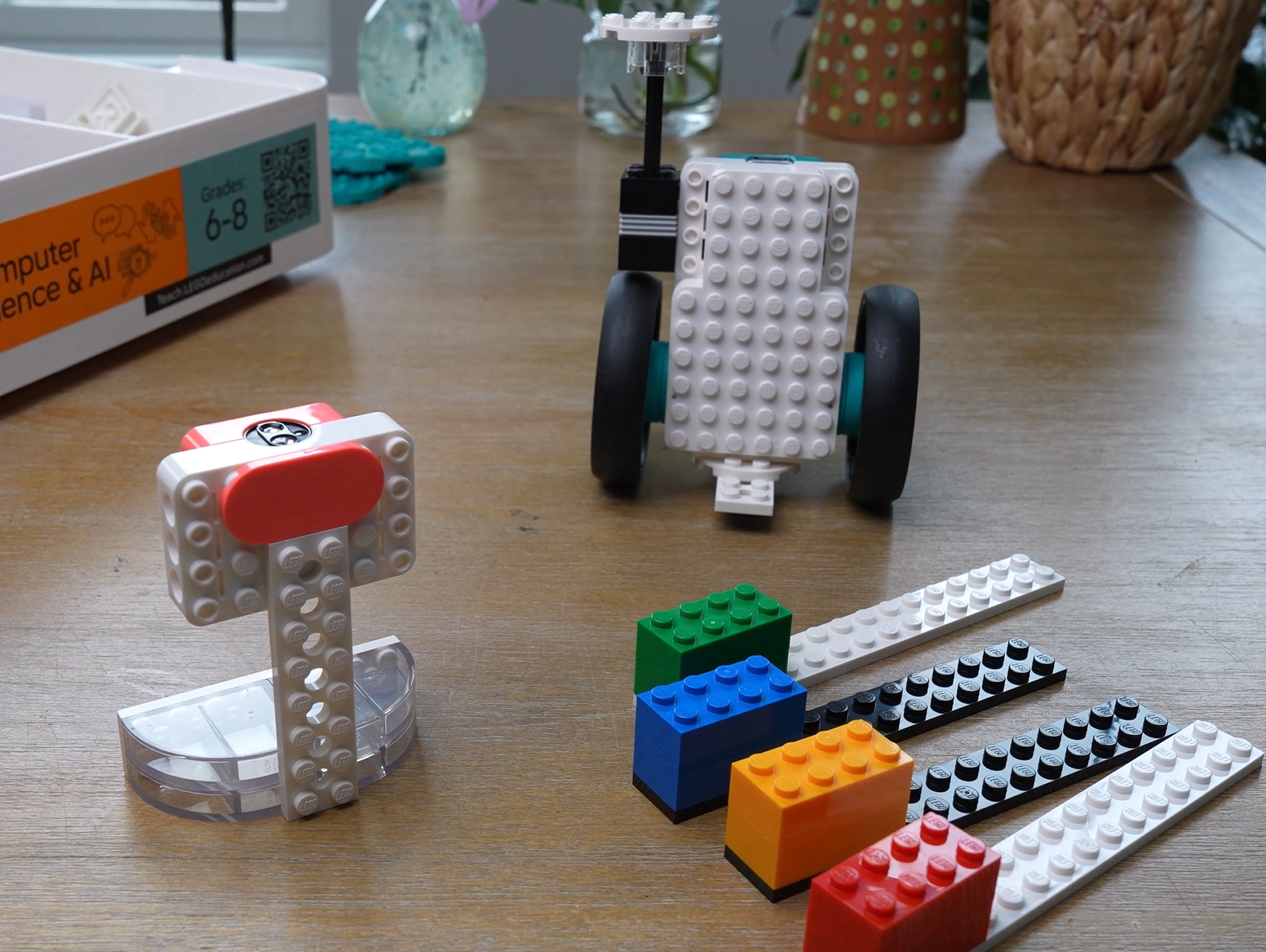
You are building a robot server that drives using the double motor, a color scanner that holds the color sensor, and a set of color bars to show the scanner.
You will need
- LEGO Education Computer Science & AI kit
- Building instructions C1, page 8 (the Restaurant Rookie model)
- The double motor, the color sensor, and a connection card
Steps
- 1Open building instructions C1 to page 8.
- 2Decide how you will build. At home, you can follow every step yourself. On a team of four, divide the tasks by color: each person picks a blue, red, green, or yellow LEGO minifigure and builds the steps marked with that color’s icon.
- 3Build the robot server.
- 4Build the color scanner.
- 5Build the color bars.
- 6Bring the three parts together.
While you build, share materials, help each other out, and ask questions. Make sure everybody gets a chance to contribute.
Check it
You have three finished pieces: a robot server with the double motor, a color scanner with the color sensor, and your color bars. Compare each one to the picture in the instructions before moving on.
Coding
There’s no screen and no code to write today. The color sensor and the double motor already come programmed with default behaviors. When you pair them with a connection card, they send and receive signals: the sensor sends an input, and the motor responds with an output. Your job is to figure out the rules, just like a programmer learning a new system.
Start it up
- 1Turn on the color sensor.
- 2Turn on the double motor.
- 3Pair them by tapping the connection card to each piece of hardware.
Investigate
- 1Hold one color bar in front of the color sensor. What happens?
- 2Try another color. What changed?
- 3Try every color you have. Watch the robot closely each time.
As you explore, ask yourself: What’s the input? What’s the output? What is the color sensor detecting? What is the motor doing?
Your color chart
Fill in one row for every color. When the sensor sees this color, what movement happens?
| Color (input) | What the robot does (output) |
|---|---|
This chart is your guide for predicting exactly how the robot will behave. That’s what programmers do all the time: they learn how inputs affect outputs.
Check it
Each color you show the sensor makes the robot server move, and different colors cause different movements. Every color has a row in your chart.
The Challenge
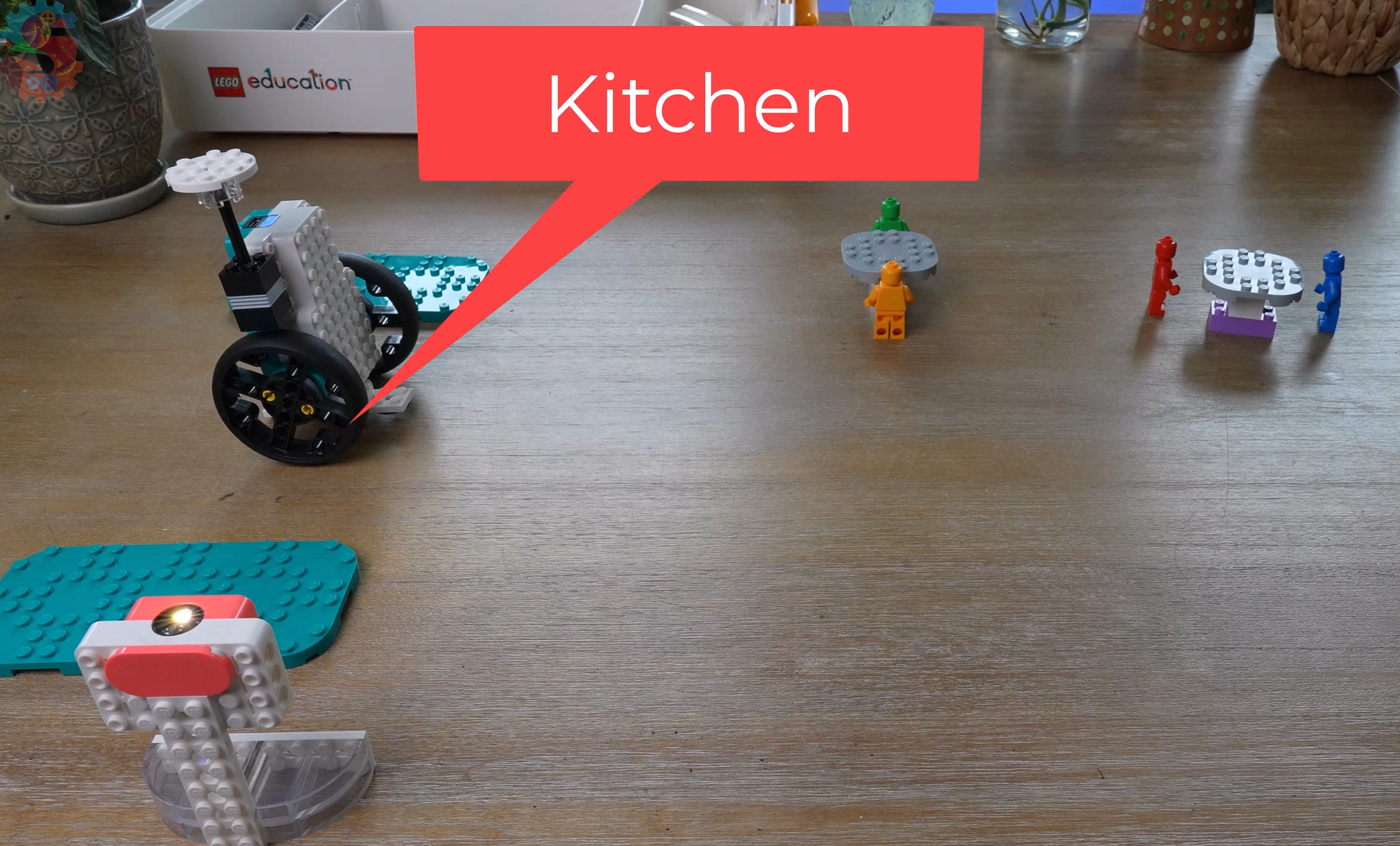
Welcome to our restaurant! It’s the robot’s first day on the job. The robot must start in the kitchen, deliver food to a table, and return safely.
Build it: set up the restaurant
- 1Decide where your kitchen will be. Mark the spot.
- 2Build some tables and mark where they go.
- 3Build food for the robot server to carry.
Hint
Place your first table close to the kitchen. Once your sequence works, try a table that’s farther away or harder to reach.
Code it: program the route with colors
Use your color chart to pick the colors that create the movements you need. Put them in order to make a sequence that guides the robot from the kitchen to a table and back. Just like following a recipe, brushing your teeth, or tying your shoes, the order matters.
- 1Plan your sequence. Write down the colors in order.
- 2Test it. Did it work?
- 3If not, that’s okay. Engineers improve things all the time. Change your sequence and test it again.
- 4Keep refining until the robot delivers the food.
Hint
Break the trip into small pieces: kitchen to table first, then table back to kitchen. Test each piece before you put them together.
Build it better
If your sequence is right but the robot still has trouble carrying the food, change the robot server so it does the job better.
Hint
Watch what goes wrong during a delivery. Does the food fall off? Change the part of the robot causing the problem.
You know it works when
Your robot leaves the kitchen, makes it to the table, and returns safely.
Share it
Explain your sequence. Which inputs did you use? What outputs happened? How did those outputs help your robot reach the right table? Could another person follow your sequence and get the same results? If so, you’ve created a reliable program.
Think About It
- 1What happened? When you changed the order of colors in your sequence, what changed about where the robot ended up?
- 2Why? The color sensor and double motor are two separate pieces of hardware. Why do you think the motor moves when only the sensor sees the color? What has to happen between them?
- 3Real world: Real robots collect information from sensors, process it, and create outputs to complete tasks. Pick a device you use every day. What are its inputs and outputs, and does it follow a sequence?
Extension Challenge
The dinner rush
Your restaurant just got busy. Add two more tables in different spots. Write a separate color sequence for each table so the robot can deliver to any of them and come back to the kitchen.
Then trade sequence cards with someone else. Can they run your sequence and get the same result? If they can’t, find the step that caused the difference and rewrite it so it’s clearer.
Keep your build together!
If you have this kit at home, don’t take the robot server apart. You’ll use it again in the next lesson. If you’re at school, take apart your robot and put everything where it belongs.
Parent Overview
What we learned
Information going into a device is an input, and what comes out is an output. Putting inputs in a specific order creates a sequence, and changing the order changes the result.
What we did
Your child built a robot server, a color scanner, and color bars from building instructions C1, page 8. They paired the color sensor and motor with a connection card, discovered what each color makes the robot do, and recorded it in a chart. Then they built a small restaurant and used a sequence of colors to send the robot from the kitchen to a table and back. No computer or app is needed for this lesson.
They’ve got it when you see
- They can tell you the color is the input and the movement is the output.
- Their color chart has a movement listed for every color.
- The robot leaves the kitchen, reaches the table, and comes back using the sequence they planned.
- They can explain their sequence well enough that you could follow it and get the same result.
If they’re stuck
- Robot doesn’t move when a color is shown: Make sure both the color sensor and the double motor are turned on, then tap the connection card to each one again to re-pair them.
- Robot does something unexpected: Check the color chart. Hold the color bar steady and close to the sensor so it reads only one color.
- Robot misses the table: Break the trip into smaller pieces and test kitchen-to-table before adding the return trip.
- Food falls off: Look at how the food sits on the robot and adjust the build to hold it better.
Challenge answers
- Code it: There’s no single correct sequence. It depends on where they put the kitchen and table. A working answer uses colors from their chart, in an order that moves the robot to the table and back.
- Build it better: Any change that helps the robot carry food reliably counts, as long as they can explain the problem it fixes.
If you are getting frustrated, take a break. We have to use a little imagination with this lesson. Getting close to a table or close to the kitchen will count as making a delivery. The biggest takeaway is that the color is an input, and the robot moving is an output.
Standards connection
- CSTA 2-CS-02: Design projects that combine hardware and software components to collect and exchange data.
- CSTA 2-AP-13: Decompose problems into parts to make them easier to solve.
- CSTA 2-AP-17: Systematically test and refine programs.
- NGSS MS-ETS1-4: Develop a model to generate data for iterative testing and modification of a proposed solution.