Drop from the Top
LEGO Education Computer Science & AI
Drop from the Top
Build a drop tower amusement park ride, use loops to lift riders up high, and iterate until the drop is a real thrill.
What You Will Learn
A loop is a coding structure that runs the same sequence multiple times. Instead of copying and pasting the same blocks over and over, you put them inside a loop once and tell it how many times to repeat. Change one number, and the loop runs more or fewer times.
You’ll also iterate: develop a little, try it, then develop it more. Test and improve. That’s how engineers and programmers make things better.
In the real world
Programmers use loops in just about everything. A video game is always checking whether you’re pressing a direction on your controller, and that check sits inside a loop that repeats forever. Amusement park rides use loops too: a pirate ship swings back and forth, a Ferris wheel goes around and around, and a roller coaster runs the same path again and again.
Today you will:
- Build a drop tower amusement park ride.
- Use a repeat loop to lift the ride car up the tower.
- Iterate on your code to make the ride drop, and then make it more exciting.
- Give your ride a theme or story.
Background
Do you have a favorite amusement park ride? Lots of rides repeat the same movement over and over:
- The pirate ship swings back and forth like a pendulum. At the top of each swing, riders get that weightless feeling.
- The Ferris wheel is a giant circle that goes around and around.
- Roller coasters run the same path again and again.
- A drop tower carries riders way up into the sky, then drops them so they feel like they’re falling.
Today you’re building a drop tower. It’s a great ride to engineer: it doesn’t take up much space, it gives a lot of thrills, and it’s easy to make changes to.
You’ll follow the engineering design process. Start with a problem: can we make an amusement park ride that’s fun? Come up with a plan: a drop tower. Then test it and improve it. It might be fun the first time, but you can always find ways to make it better.
Build It
You are building two parts: a tower with a monorail track, and a ride car powered by the double motor that climbs the track and carries your rider.
You will need
- LEGO Education Computer Science & AI kit
- Building instructions C1, page 42
- The double motor, a red rubber band, and a minifigure to be your test dummy
Build the tower
- 1Open building instructions C1 to page 42. On a team, split the build by color (blue, red, yellow, green). In pairs, each person takes two colors. On your own, build the whole thing.
- 2Start with the big plate. You want something sturdy on the very bottom. Add the two connector pieces that attach the Technic pieces to the plate.
- 3Build the clear gearbox. It holds a gear in one spot so it doesn’t slip.
- 4Put the gray pieces together and hold them with the pink piece.
- 5Mount the gearbox onto the plate.
- 6Put the first set of monorail track in place. The bottom goes on the blue side, and the side with the ridges (the gear teeth) faces the studs on the gearbox.
- 7Attach the gray piece, sandwiching the track pieces together so the tower stays sturdy.
Build the ride car
- 1Build a second gearbox with the tan gear. Slide the gray axle all the way through, add the pink piece, and put the yellow piece coming out of the edge. Spin it, and the gear should turn.
- 2Build the two white beams.
- 3Build two guide rails using pegs with a smooth turquoise piece on top. These help hold the car on the track. Add the black piece.
- 4Get the double motor. The front has the power button, and it has two motors: left and right. Put two yellow axles in.
- 5Find the two pulley wheels, the red rubber band, and your test dummy.
Put it all together
- 1Put the car’s gearbox on top of the double motor, facing you. The yellow axles go one on top of the other.
- 2Add the gray piece facing the front of the ride.
- 3Put on the pulley wheels with the larger side against the gray beam.
- 4Put the two white beams on top of the gearbox.
- 5Connect the two pulleys with the red rubber band. Turn the bottom pulley. It should turn the gear.
- 6Push the pins into the gearbox and the double motor to add the guide rails. You’ll know it’s right when the white bricks face each other and the smooth guide rails are on the outside.
- 7Add the harness to the very top. This is where your rider sits. Make sure the seat faces out the front.
- 8Check the instructions for the brick that goes on the back of the car to hold things together. It’s easy to miss!
- 9From the top of the tower, slide the car onto the track through the gear. Let go, and it should fall down on its own.
- 10Put the flat black piece on the very top of the tower. This cap keeps the ride from going right off the track.
- 11Drop your rider into the harness with their arms up, like they’re ready to ride. You don’t need to take the pink piece off.
Check it
Pick up the tower. The car stays on the track without falling out. Slide the car up and let go. It should fall to the bottom on its own. The seat faces the front, and the cap is on top.
Coding
Predict first
Look at this code and predict what it will do.
| Block | What it does |
|---|---|
| when ▶ clicked | Starts the program when you press Play. |
| repeat 3 | Runs the blocks inside it 3 times. |
| run right motor ↻ for 1 rotations | Inside the loop: turns the right motor clockwise one full turn. |
| wait 1 seconds | Inside the loop: pauses for one second. |
You could get the same result by copying and pasting “run right motor” and “wait” three times. The loop does it with fewer blocks, and you can change one number to make it run more times.
Connect your ride
- 1Go to code.legoeducation.com and enter PIN 1306. Check that the page says Drop from the Top, then press Start.
- 2Press the button on the double motor two times. You’ll hear a beep when it turns on, then a signal sound.
- 3Choose continue without a card if you’re using your own kit at home. In a classroom, use a connection card. Skip the instructions.
- 4Click double motor and pair. It chirps when it’s paired.
- 5If your double motor starts updating, let it finish. You’re ready when you see a green check mark at the top.
The starter code
The program starts with two stacks, plus two blocks off to the side that aren’t attached yet.
| Ride stack | What it does |
|---|---|
| when ▶ clicked | Starts the ride when you press Play. |
| repeat 3 | A loop with nothing inside it yet. |
| run right motor ↻ for 1 rotations | Off to the side: turns the right motor clockwise one full turn, which lifts the car. |
| wait 1 seconds | Off to the side: pauses for one second. |
| Motor setup stack | What it does |
|---|---|
| when ▶ clicked | Runs at the same time as the ride stack. |
| when right motor stops, hold position | When the motor stops, it keeps gripping so the car doesn’t slide down. |
| set right motor speed to 20% | Sets how fast the right motor turns. |
Try it
- 1Test it once first. Drag the empty repeat block off to the side and snap “run right motor” and “wait” right under “when ▶ clicked.” Press Play. The car goes up a little. Press Stop, and the car slides back down. “Hold position” is what keeps the car from sliding. When the motor stops, it keeps gripping the gear. Without it, the car just falls.
- 2Put the repeat 3 block back under “when ▶ clicked,” then drag “run right motor” and “wait” inside it. Now you’ve made a loop! Move the loop and the blocks inside travel with it.
- 3Press Play. The car climbs three times, and then nothing happens. Your rider is stuck at the top!
- 4Iterate: add a stop all block at the bottom, after the loop. Stop all tells the right motor to stop holding its position.
- 5Press Play again. The car climbs three times, waits a second, and then your rider drops.
Watch the coding canvas while your program runs. It highlights the block it’s working on.
Check it
The car climbs in three steps, then drops to the bottom after stop all.
The Challenge
You’ve made a drop ride, but it’s not very exciting yet. Real drop towers carry riders way up high, then drop them fast. Make your ride fall faster and add more variation, so it’s more fun to ride.
Build it: give your ride a theme
- 1Take about five minutes to give your ride a story or theme.
- 2Build scenery around your tower to match it.
Need ideas?
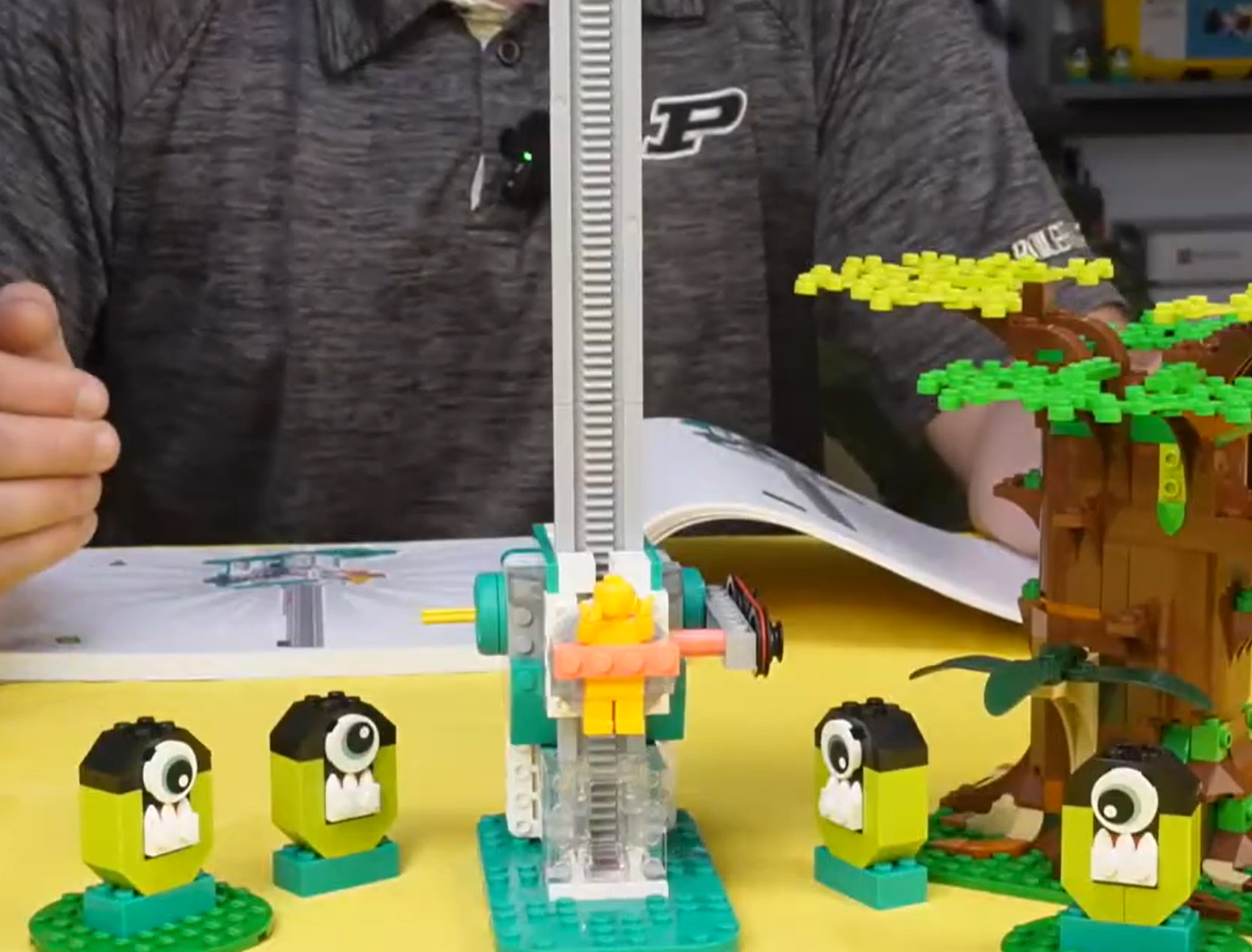
A rainforest ride called the Canopy Drop could have a big tree and little animals all around it. The Tower of Terror at Walt Disney World tells a story about a hotel elevator struck by lightning. Or try a spooky haunted house drop. A great story makes a ride more exciting, but even a great story won’t fix a dud of a ride that only goes halfway up and slowly falls!
Build it better
Slide the car up by hand and let it go. Does it drop smoothly, or does it catch on something? Check that the rubber band is on both pulleys, the guide rails are on the outside, and nothing rubs on the track. A car that slides freely drops faster.
Hint
If the car drops faster by hand than when your code runs, the problem is in your code, not your build.
Code it: make the ride more exciting
Keep your code and improve it, or drag it all off to the side and start fresh. Try one change at a time and test after each one.
- 1Go higher. Change the number in your repeat loop. The higher the number, the higher the car climbs. If the car runs into the cap at the top, use a smaller number.
- 2Add a warning. Swap stop all for a play sound block. To pick a new sound, click the sound name, click Add, choose a sound like alarm, and confirm.
- 3Drop the car. Add when right motor stops, coast, which lets the motor go instead of holding. Then add run right motor ↺ (counterclockwise) to start the car moving down.
- 4Add variation. Right-click your loop and copy it, then paste a second loop below. Make one loop go halfway up and drop, and the other go all the way to the top and drop. Put a wait between them so the car has time to reach the bottom.
- 5Test and iterate. Press Play and watch the coding canvas highlight each block. Did the car slip when it should be climbing? Did it get stuck at the top? Change your code and test again.
Hint
“Hold position” and “coast” stay set until you change them. If the car slides back down while it’s trying to climb, add when right motor stops, hold position right before each climbing loop. Switch to coast only when it’s time to drop.
Hint
To make the drop faster, set the right motor’s speed higher, like 50%, just before the drop. Then run it counterclockwise for more rotations, like 2, 3, or 4.
You know it works when
The car climbs up the tower, drops all the way to the bottom, and falls faster than your first version.
Think About It
- 1What happened? How many loops did you use, and how many times did each one repeat? Why did you choose those numbers?
- 2Why? Why did the car slide back down while it was trying to climb after you switched the motor to coast? What did you change to fix it?
- 3Real world: Think of a video game or app you use. What is something it has to do over and over again that a programmer might put inside a loop?
Lab book
Write how you used loops and one change you made. Try this sentence: “A problem we ran into was ______, and we fixed it by ______.” That’s how you write about iterating.
Share it: Leave a comment on the video. What theme did you give your drop ride, and how did you make it drop faster?
Extension Challenge
Surprise drop
The scariest drop rides are the ones where you don’t know when the drop is coming. Add a wait block before each drop and put a pick random number from 2 to 5 inside it. Now the ride is a little different every time.
Then go further: put your whole program inside a loop so the ride goes halfway, then to the top, over and over again. How many times should it repeat before riders get off?
Parent Overview
What we learned
A loop runs the same blocks of code multiple times, so you don’t have to copy them over and over. Iterating means building a little, testing it, and improving it.
What we did
Your child built a drop tower ride from building instructions C1, page 42, with a double motor that climbs a monorail track. At code.legoeducation.com (PIN 1306), they put blocks inside a repeat loop to lift the car up the tower. Then they tested, found problems, and changed their code to make the ride drop and to make it more exciting. They also gave their ride a theme.
They’ve got it when you see
- They can point to their loop and tell you how many times it repeats and what’s inside it.
- They change the number in the loop to make the car climb higher or lower.
- The car climbs, then drops all the way to the bottom.
- They can describe a problem they ran into and what they changed to fix it.
If they’re stuck
- The computer can’t find the motor: Press the button on the double motor twice, then click double motor and pair. If it starts updating, wait for the green check mark.
- The car slides down after each climb: Make sure “when right motor stops, hold position” is set before the car climbs.
- The car gets stuck at the top: Add a block that releases the motor: stop all, or “when right motor stops, coast” followed by running the motor counterclockwise.
- The car hits the top of the tower: Lower the number in the repeat loop.
- The car falls out of the track: Check that the flat black cap is on top of the tower and the guide rails’ white bricks face each other.
Challenge answers
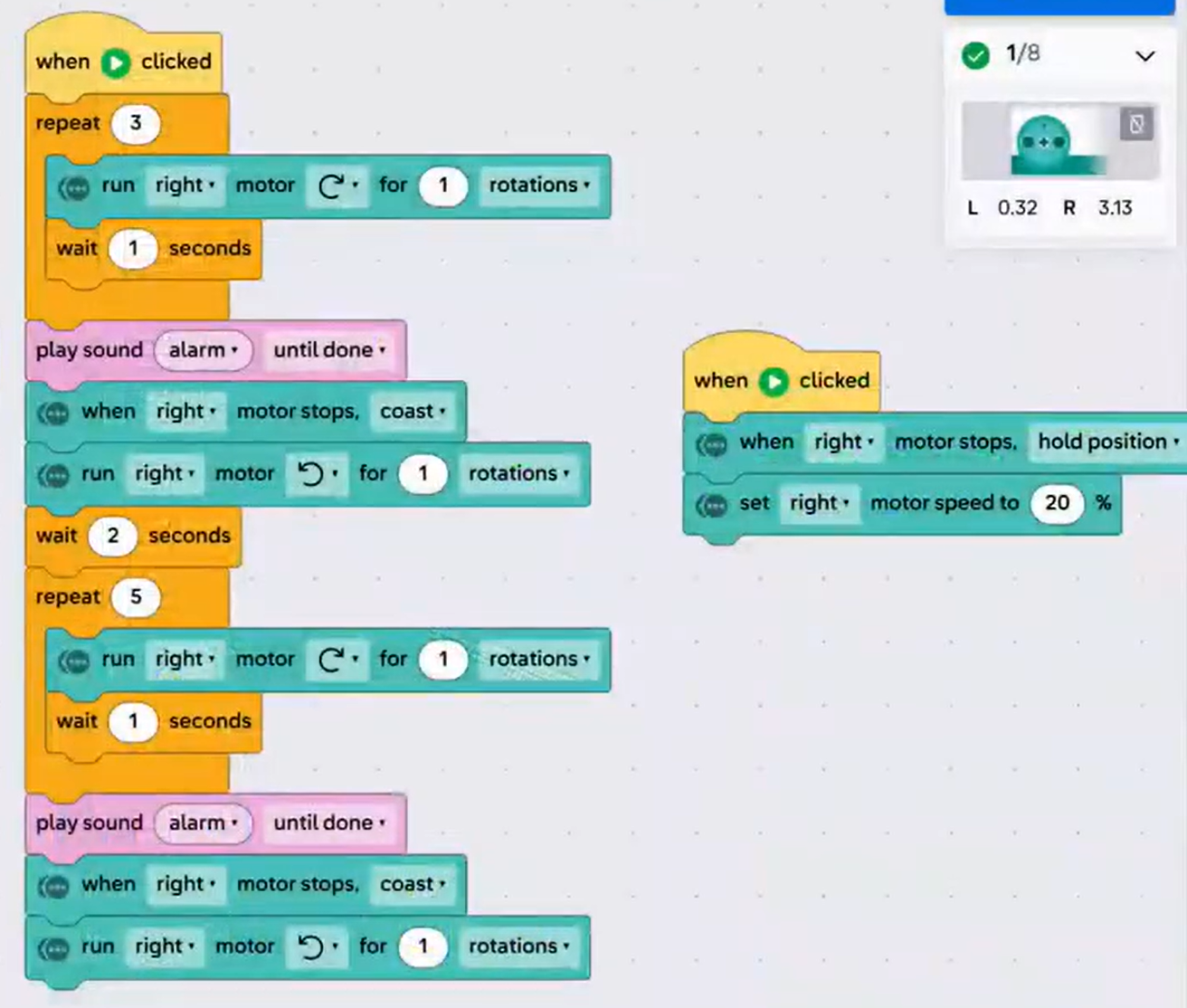
There’s no single right answer. Here is the program from the video, which climbs halfway, drops, then climbs to the top and drops:
| Block | What it does |
|---|---|
| when ▶ clicked | Starts the ride. |
| repeat 3: run right motor ↻ 1 rotation, wait 1 second | Climbs halfway up in three steps. |
| play sound alarm until done | Warns riders the drop is coming. |
| when right motor stops, coast | Lets go of the motor’s hold. |
| run right motor ↺ for 1 rotations | Starts the car moving down. |
| wait 2 seconds | Gives the car time to reach the bottom. |
| repeat 5: run right motor ↻ 1 rotation, wait 1 second | Climbs all the way to the top. |
| play sound alarm until done | Warns riders again. |
| when right motor stops, coast | Lets go of the motor’s hold. |
| run right motor ↺ for 1 rotations | Drops the car to the bottom. |
A second stack, unchanged from the starter code, sets “when right motor stops, hold position” and the right motor speed to 20%.
When this ran, the car slipped back down during the second climb, because the motor was still set to coast. That’s the iteration in this lesson: the fix is to add “when right motor stops, hold position” right before the second loop. A longer wait (up to 4 seconds) and a stop all at the end help the car reach the bottom. To make it drop faster, set the right motor speed higher (like 50%) before each drop and run it counterclockwise for more rotations.
- Build it better: Any change that makes the car slide more freely counts, as long as they can explain what was catching.
Standards connection
- CSTA 2-AP-12: Design and iteratively develop programs that combine control structures, including nested loops and compound conditionals.
- CSTA 2-AP-17: Systematically test and refine programs using a range of test cases.
- CSTA 2-AP-19: Document programs in order to make them easier to follow, test, and debug.
- NGSS MS-ETS1-4: Develop a model to generate data for iterative testing and modification of a proposed solution.