CS 6-8 : Wakeup Call
LEGO Education Computer Science & AI
Wake Up Call
Design an alarm clock that works the way you want it to, then use repeat until loops to keep it ringing, add a snooze button, and finally turn it off.
What You Will Learn
A loop makes something happen over and over again. Today you’ll use a repeat until loop, a loop that keeps going until something specific happens.
The “something specific” is a boolean: a question that can only be true or false, like “Are both levers down?” While the answer is false, the loop keeps repeating. The moment it becomes true, the program jumps out of the loop and moves on.
In the real world
A fire alarm is on a repeat until loop. The lights flash and the sound keeps going until somebody presses a button to turn it off. Your alarm clock’s snooze button works the same way.
Today you will:
- Build an alarm clock and a control button.
- Use a repeat until loop to stop an alarm with the controller.
- Add a snooze feature and a comment that explains it.
- Put one loop inside another so you can snooze as many times as you want.
Background
How do you wake up in the morning? There are many ways:
- A parent wakes you up or opens your door.
- An alarm on a cell phone goes off.
- A clock in your room has an alarm built in.
One thing’s for certain: the way you wake up might be how the rest of your day goes. Have you ever woken up to an abrasive alarm, one of those screeching noises that just keeps going off? Some people need that screeching noise. Others like a soft, soothing, slow wake-up. Some alarm clocks even get louder slowly. You can design an alarm clock to make waking up effective, peaceful, or both.
Today you’ll build a clock and a button to work with it. The button is the input. What happens to the clock is the output.
Think about fire alarms
When a fire alarm goes off, you get flashing lights and a loud sound, and it keeps going. What stops it? Inside the building there’s a button, usually in the electrical room where only a few people can get to it, because you want to clear the building first. Until somebody pushes that button, the fire alarm is on a repeat until loop. It’s going to keep going forever until that button gets pressed.
Build It
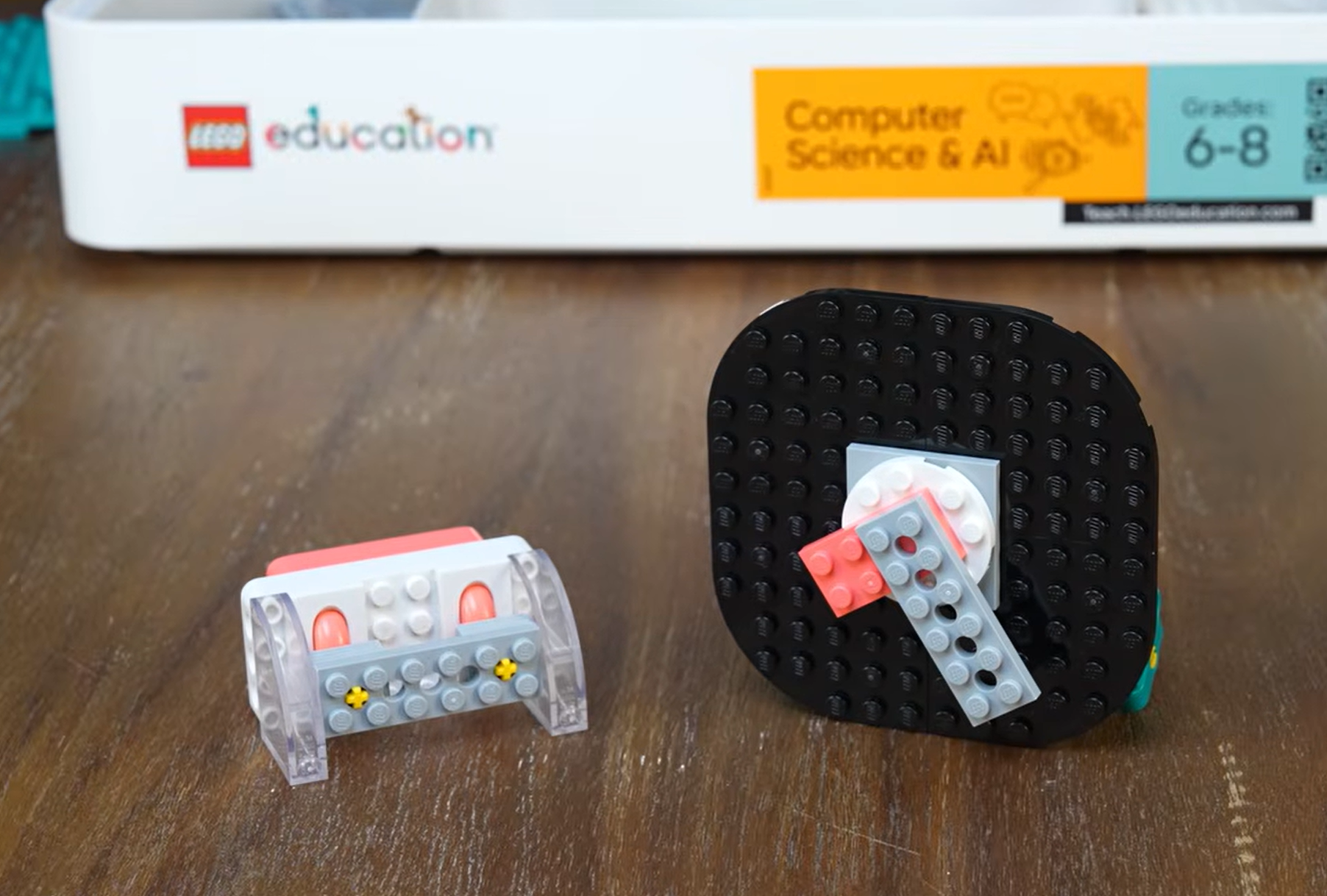
You are building an alarm clock on the double motor, so the whole clock can spin, and a control button using the controller.
You will need
- LEGO Education Computer Science & AI kit
- Building instructions, starting on page 68
- The double motor, the controller, and a connection card
Watch out for these
- 1Pause and build. Follow the building instructions starting on page 68.
- 2Set the clock to the current time. The short pink hand is the hour hand, and the long gray hand is the minute hand. You might have to take the hands off and reattach them to show the right time.
- 3Lay the clock down on the table while you set the time, so it doesn’t rotate freely and change your time.
- 4Connect the controller and double motor to each other. Turn them both on and scan the same connection card. The instructions say blue, but any color works as long as it’s the same card for both.
- 5Explore. Take a few minutes to figure out how your clock and controller work. What happens when you press the levers? What’s turning?
Check it
Your clock shows the current time, with the pink hour hand and gray minute hand in place. Your controller and double motor are connected, and moving the levers makes something on your clock turn.
Coding
Connect your alarm clock
- 1Go to code.legoeducation.com and enter PIN 1308. Check that the page says Wake-Up Call, then click Start.
- 2Choose the same connection card you used when you built (Mr. Spratt used the blue diamond card), then click Next. If this is your own kit, you can continue without a card.
- 3Push the button on the double motor. A flashing light means it’s searching for Bluetooth. When it pops up on screen, click pair.
- 4Connect the controller the same way.
Tip
If you see Preparing in the corner, your device is getting a firmware update with the newest code and features. Let it finish.
The starter code
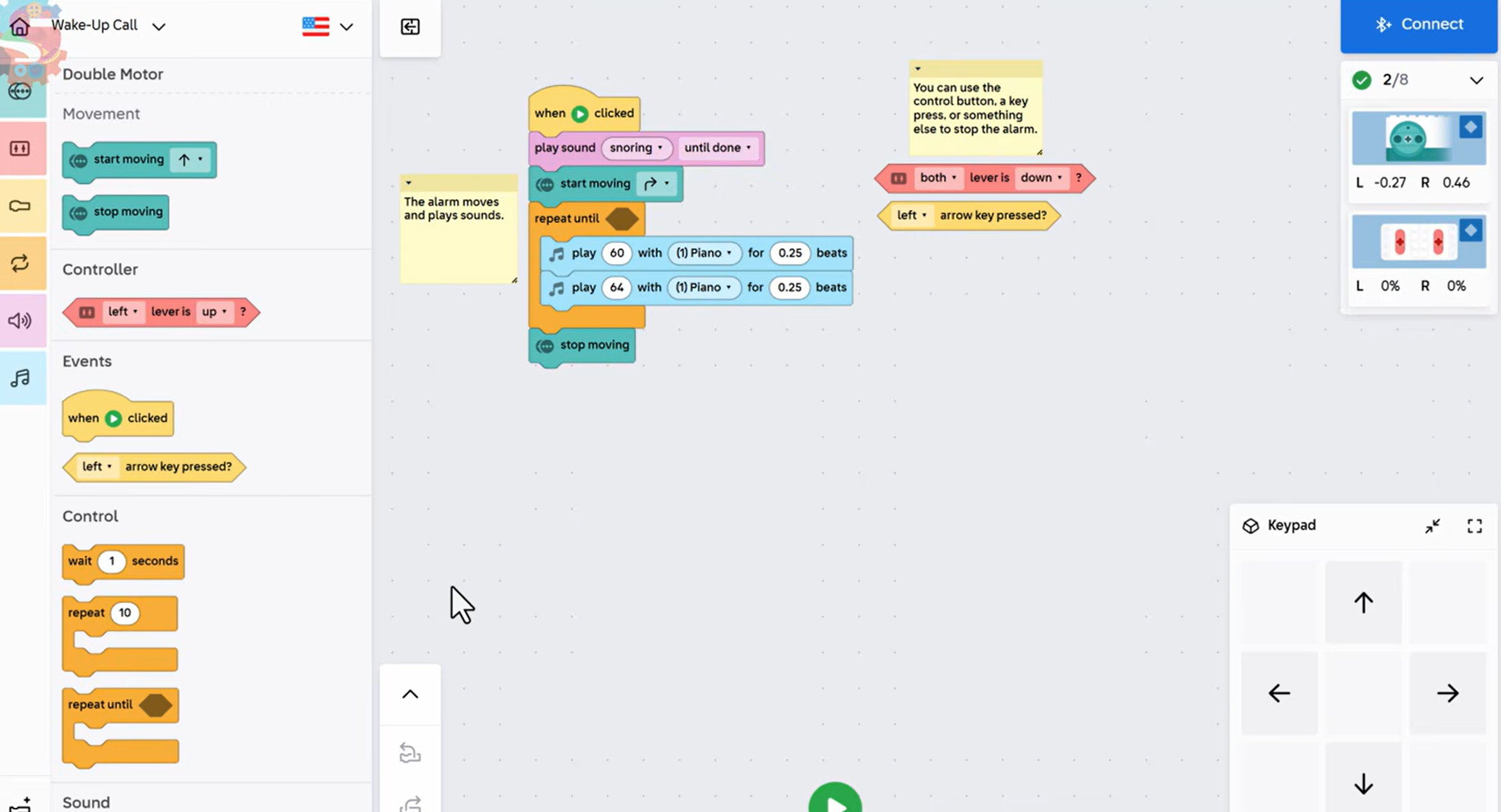
This is your coding canvas, where you lay out your code. The yellow notes are comments. They tell anyone reading your code what it’s supposed to do. Look closely and predict: what do you think this code will do?
| Block | What it does |
|---|---|
| when ▶ clicked | An event. It starts the program when you press Play. |
| play sound snoring until done | Plays a snore before the alarm goes off. |
| start moving ↱ | The double motor starts spinning the alarm clock. |
| repeat until ⬢ | A loop with an empty space. It repeats until whatever goes in that space is true. |
| play 60 with (1) Piano for 0.25 beats | Inside the loop: plays a piano note. |
| play 64 with (1) Piano for 0.25 beats | Inside the loop: plays a second piano note. |
| stop moving | After the loop ends, the clock stops spinning. |
Off to the side are two blocks that aren’t attached yet: both lever is down? and left arrow key pressed?
Try it
- 1Press Play. Your alarm goes off, and there’s no way to stop it with the controller. When you press a lever, you can see things happening in the top right corner, but the alarm keeps going. That’s because nothing is in the repeat until block yet. Press Stop on your screen.
- 2Drag both lever is down? into the empty space in repeat until. Are both levers down right now? No, so that’s false. Push them down. Now it’s true.
- 3Press Play. You hear the snore, and the clock starts to move. Push both levers down, and the alarm comes to a stop.
No kit yet?
Use left arrow key pressed? instead. You can still hear the alarm on your computer. Press the right arrow key and nothing happens. Press the left arrow key, and the alarm stops, because “left arrow key pressed?” just became true.
Check it
The alarm snores, spins, and plays piano notes over and over, and it stops only when you push both levers down. Can you explain to somebody else how a repeat until loop works?
Add a snooze button
People don’t always want to wake up as soon as their alarm goes off. Instead of turning the alarm off, make the levers pause it for a short time.
- 1If you used the left arrow key, drag it back over to the blocks to delete it, and put both lever is down? back in the repeat until.
- 2Under stop moving, add wait 5 seconds from Control. That pauses the alarm. In real life you’d want five minutes, but five seconds is quicker to test.
- 3The alarm needs to come back on. Add start moving ↱, then a second repeat until both lever is down? with the piano notes inside, then stop moving.
- 4To get the same notes, right-click the first loop’s notes, click Copy, then Paste. Or change the numbers to match: 60 and 64 for 0.25 beats.
- 5Add a comment so others know what the wait is for. Right-click, choose Add comment, and type: This is the snooze feature. On a Chromebook, you might have to click with two fingers.
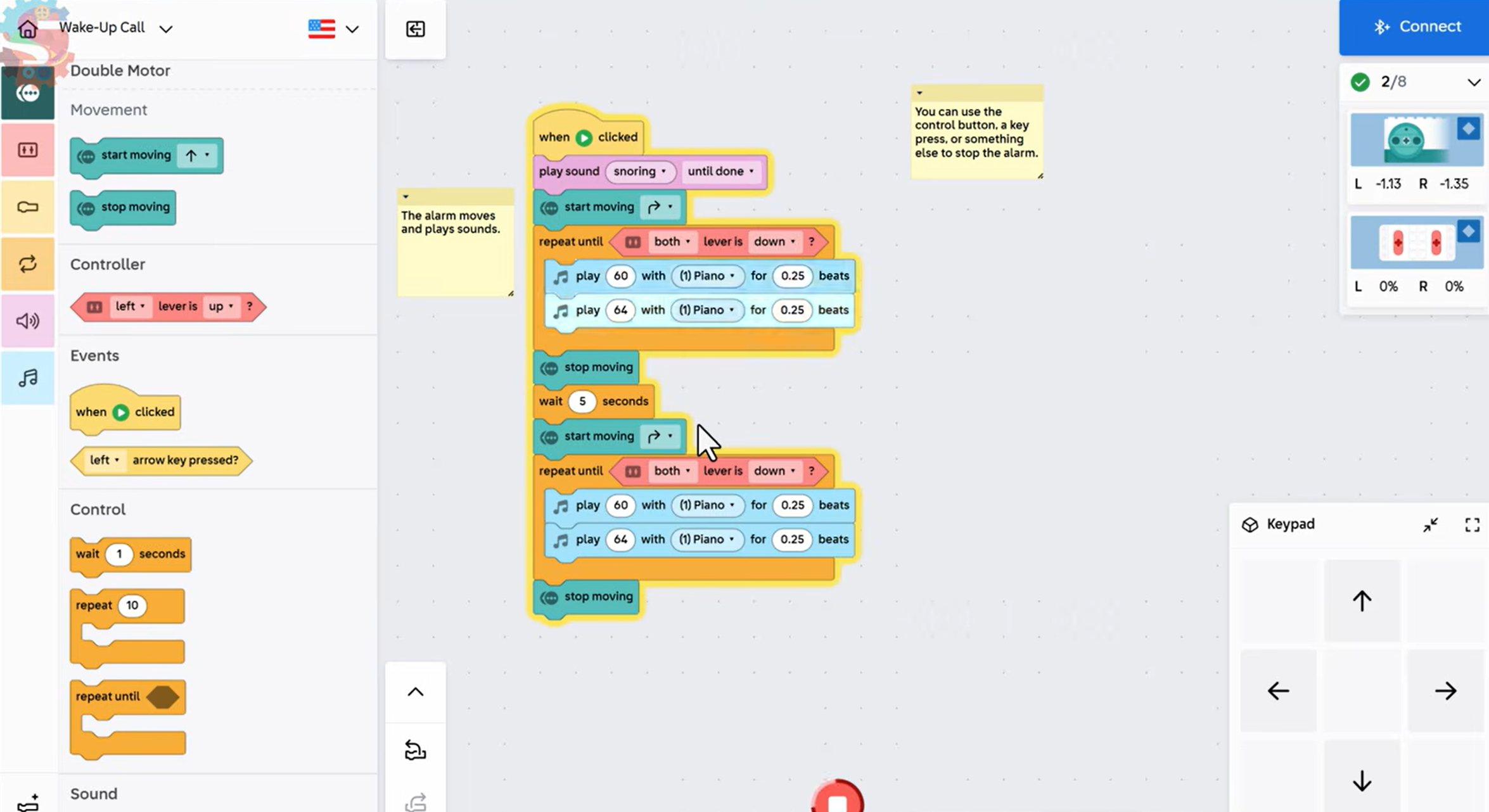
| Snooze-once code | What it does |
|---|---|
| when ▶ clicked | Starts the alarm. |
| play sound snoring until done | Snore. |
| start moving ↱ | The clock starts spinning. |
| repeat until both lever is down? | The alarm rings until you push the levers down. |
| play 60, play 64 (0.25 beats) | The alarm sound. |
| stop moving | The clock stops. |
| wait 5 seconds | Snooze. |
| start moving ↱ | The clock starts spinning again. |
| repeat until both lever is down? | The alarm rings again until you push the levers down. |
| play 60, play 64 (0.25 beats) | The same alarm sound. |
| stop moving | The alarm is totally off. |
What was missing?
When Mr. Spratt first tested his snooze, two things were missing from the second alarm. The sounds were different, because the notes weren’t set to 0.25 beats, and the clock never started moving again. If your second alarm sounds different or doesn’t spin, check those two spots.
Check it
Push the levers down, and the alarm stops for five seconds. Then it rings and spins again. Push the levers down a second time, and the alarm is totally off.
The Challenge
Your alarm clock only lets you snooze once. That’s making a big decision for your user. Can you change your code so you can snooze as many times as you want, and the alarm finally turns off completely when you switch the levers up?
Code it: unlimited snooze
Think about it, pause, and try to come up with your own solution. There are lots of different ways to solve this.
- 1Pushing the levers down should pause the alarm for five seconds, then start it again.
- 2This should happen every time you push the levers down.
- 3Pushing the levers up should turn the alarm off completely.
Hint
You already have a loop that rings until the levers go down, followed by a snooze. What if that whole snooze section repeated until something different happened? A loop can go inside another loop.
Build it better: make it your own
Add some LEGO pieces to your alarm clock to make it unique. Is it a gentle alarm clock or a wild one? Design it to match the way you want to wake up.
Hint
The whole clock spins on the double motor, so keep your add-ons attached firmly and balanced.
You know it works when
Every time you push the levers down, the alarm pauses for five seconds and then starts again. To turn it off for good, push the levers down to start a snooze, then hold the levers up while it waits. When the program tries to restart the loop, it exits instead, and the alarm is off.
Think About It
- 1What happened? Why couldn’t you stop the alarm when you first ran the starter code? What changed when you added “both lever is down?”
- 2Why? In your unlimited snooze, why does pushing the levers up turn the alarm off, but pushing them down only pauses it? Which loop is inside which?
- 3Real world: A fire alarm repeats until someone presses a button. What is something else in your life that repeats until something specific happens?
Share it: Go tell somebody how you used repeat until loops to make your alarm clock.
Extension Challenge
Design your perfect alarm
Reprogram your alarm clock to work exactly how you want it to:
- Change the sounds to something you like better. Do you need a screeching alarm, or a soft, soothing wake-up?
- Choose the number of snoozes. Do you want to snooze one time, twice, three times, or an unlimited number of times?
Add comments to your code so somebody else can tell how your alarm works.
Parent Overview
What we learned
A repeat until loop keeps running until a true-or-false condition becomes true, like an alarm that rings until you press a button. Loops can also go inside other loops.
What we did
Your child built an alarm clock on a double motor and a control button from building instructions starting on page 68. At code.legoeducation.com (PIN 1308), they used a repeat until loop so the controller levers stop the alarm, added a five-second snooze, and then put loops inside loops so the alarm can snooze as many times as they want before turning off.
They’ve got it when you see
- The alarm keeps ringing until they push the levers down.
- They can explain that the condition in repeat until is either true or false.
- Their alarm snoozes, comes back on, and eventually turns off.
- They’ve added a comment explaining the snooze feature.
If they’re stuck
- The alarm won’t stop: The repeat until block is probably still empty. Drag “both lever is down?” into it. Press Stop on the screen to end the program.
- The controller doesn’t connect: The controller and double motor need to use the same connection card. If it says Preparing, wait for the firmware update to finish.
- The second alarm sounds different or doesn’t spin: Check that both notes are 0.25 beats and there’s a start moving block before the second loop.
- The clock shows the wrong time: Lay it flat on the table while setting the hands so it doesn’t rotate.
- They can’t right-click to add a comment: On a Chromebook, click with two fingers.
- The alarm won’t turn off completely: Push the levers down to start a snooze, then hold them up during the five-second wait.
Challenge answers
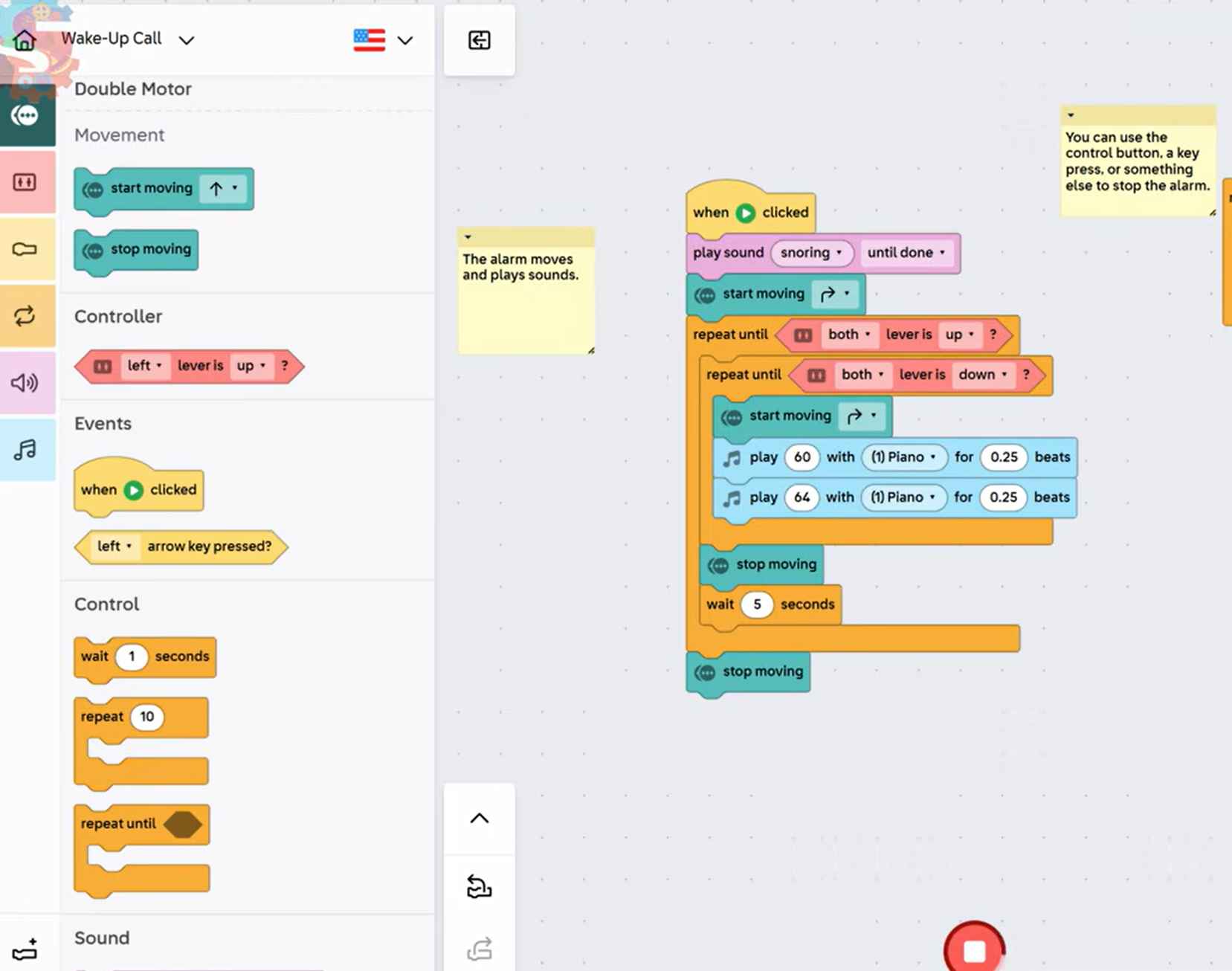
There are lots of possible solutions. Here is Mr. Spratt’s unlimited-snooze program:
| Block | What it does |
|---|---|
| when ▶ clicked | Starts the alarm. |
| play sound snoring until done | Snore. |
| start moving ↱ | The clock starts spinning. |
| repeat until both lever is up? | The outer loop. The only way out is pushing the levers up. |
| repeat until both lever is down? | The inner loop. The alarm rings until the levers go down. |
| start moving ↱ | Keeps the clock spinning while it rings. |
| play 60, play 64 (0.25 beats) | The alarm sound. |
| stop moving | The levers went down, so the clock stops. |
| wait 5 seconds | Snooze. Then it goes back to the top of the outer loop. |
| stop moving | The levers went up, so the alarm is off for good. |
The original snore alarm stays at the start. Mr. Spratt moved the start moving block inside the inner loop, so the clock starts spinning again every time the alarm comes back on. He kept the “This is the snooze feature” comment with the wait block.
- Build it better: Any add-on counts, as long as the clock can still spin on the double motor.
Standards connection
- CSTA 2-AP-12: Design and iteratively develop programs that combine control structures, including nested loops and compound conditionals.
- CSTA 2-AP-17: Systematically test and refine programs using a range of test cases.
- CSTA 2-AP-19: Document programs in order to make them easier to follow, test, and debug.
- CSTA 2-CS-02: Design projects that combine hardware and software components to collect and exchange data.