A rover is an automated motor vehicle that propels itself across the surface of a celestial body. A rover may examine territory and interesting features, analyze weather conditions, or even test materials, such as soil and water.
What does it take to go to Mars?
People have long been fascinated by Mars, the planet in our solar system that’s most like Earth. Uncrewed missions have sent orbiters, probes, and rovers to explore the planet since the 1960s, but what would it take to carry out a successful human mission to Mars?
Mission Mars Unit Overview
In this unit, your students will work as scientists and engineers. They’ll immerse themselves in motivating STEM activities that prompt creative problem-solving, communication, and exploration.
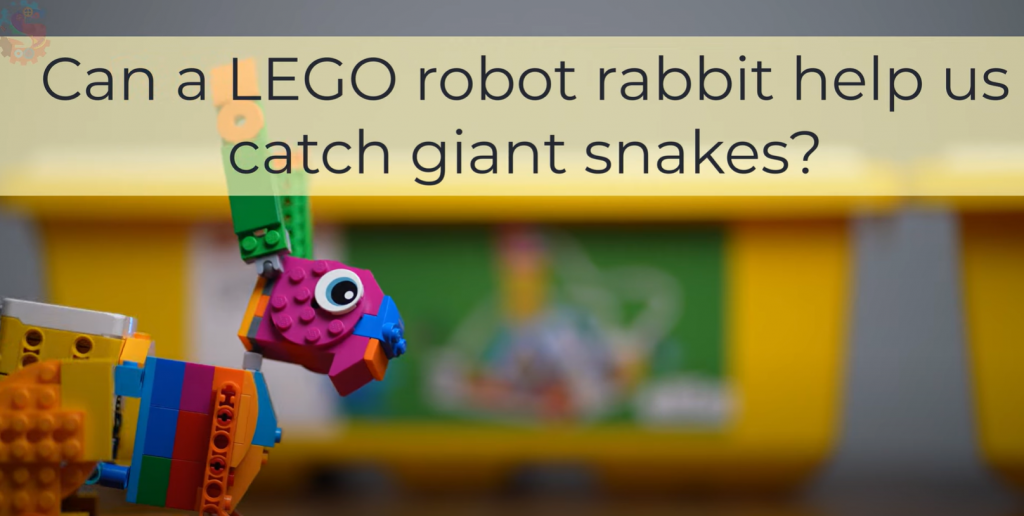
Today you are an engineer! Your mission is to design and build a robot rabbit that can move in a rabbit-like way. We’ll use the Engineering Design Process:
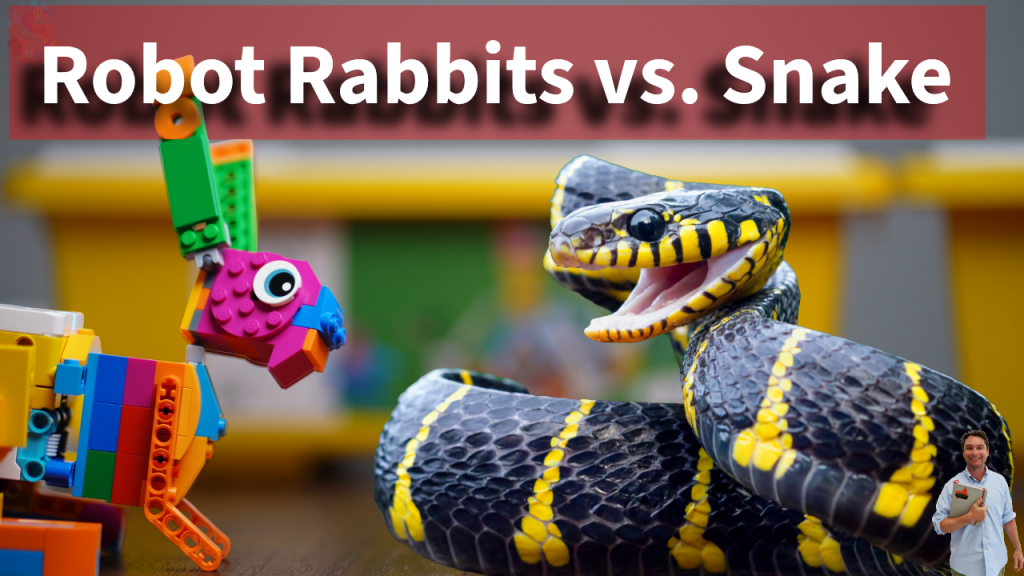
Real-World Context: In Florida’s Everglades, invasive Burmese pythons hurt native wildlife. Engineers experiment with “robot rabbits” to lure and safely capture pythons so scientists can protect other animals. Your goal: Build a rabbit-like robot that shows realistic motion (hopping, moving forward, or “being interesting” to a predator) and can keep moving without falling apart.
Challenge
Deep in the Florida Everglades, something unusual is hopping into action. It’s not a real rabbit—it’s a robot bunny! And this little machine has a big job: helping scientists fight one of the Everglades’ most dangerous invaders, the Burmese python.
Why Pythons Are a Big Problem
Burmese pythons are not supposed to live in Florida. They came to the U.S. as pets in the 1970s, but some were released into the wild. By the 1980s, they were living and breeding in the Everglades.
These snakes are huge—some grow over 18 feet long—and they eat almost anything they can catch. That includes raccoons, rabbits, opossums, bobcats, and even deer.
Scientists found that in parts of the Everglades, mammal populations have dropped by more than 90%. For example, marsh rabbits, a favorite python snack, have nearly disappeared. With so many animals gone, the entire ecosystem is out of balance.
Today, there may be tens of thousands of Burmese pythons in Florida, and they’re spreading farther north each year.
The Idea of Robot Rabbits
To stop the pythons, researchers at the University of Florida came up with a creative plan: build fake rabbits that trick the snakes.
These aren’t ordinary toys. Each robo-bunny is stuffed with special electronics:
Motors to make it move and hop.
Heaters to give it the same warm body temperature as a real rabbit.
Cameras and sensors to alert scientists when a python comes close.
Solar panels so they can recharge in the Florida sun.
From far away, they look just like marsh rabbits—the kind pythons love to eat.
When a python slithers near, the robot alerts the research team. The hope is that the snakes can then be caught before they eat more of Florida’s wildlife.
Why Not Use Real Rabbits?
Scientists tried that years ago. They placed live rabbits in pens, and pythons showed up almost every week. But caring for live animals across the huge Everglades was too difficult and not very kind to the rabbits.
The robo-bunnies solve that problem. They can survive in water, mud, and rain, and they don’t need food or care. Some researchers are even testing if adding rabbit scent will make the robots more convincing.
Other Ways Florida Fights Pythons
Robot rabbits aren’t the only strategy. Florida has tried many ways to reduce the python population, including:
Hiring expert hunters, even bringing in snake catchers from India.
Holding the Florida Python Challenge, a yearly event where hunters compete for cash prizes by capturing snakes.
Paying full-time hunters who get bonuses for catching longer snakes. Since 2019, hunters have removed more than 15,000 pythons.
Even with these efforts, the snakes are still winning. That’s why scientists are excited to try bold ideas—like robo-bunnies.
Could Robo-Bunnies Save the Day?
The project is still in its early stages. Right now, scientists are testing 40 robo-bunnies in different areas of South Florida. If they work, they could help hunters find more pythons, faster, and bring back balance to the Everglades.
It may sound a little silly to fight giant snakes with toy rabbits. But sometimes, solving big problems requires small, creative solutions.
As one scientist put it: “After 10 years of studying the problem, you don’t just want to watch it happen—you want to do something.”
And maybe, just maybe, robo-bunnies are the heroes the Everglades have been waiting for.
Brainstorm
Come up with ideas on how to solve the problem.
List or sketch 3 different features that are important to include with our robot.
Parts or mechanisms we might try (check any): ☐ Legs with hinges ☐ Wheels as “feet” ☐ Cams/lifters ☐ Rubber band power ☐ Gear train ☐ Counterweights ☐ Tail/ears for balance
Design
Sketch out your robot plan. What parts do you think you will need to make your rabbit a reality?
Create
Build your robot using the materials you have. You can build a robot rabbit using a LEGO Spike Essential Kit, a LEGO Spike Prime Kit, or just LEGOs you have with you.
Build checklist: ☐ Frame is sturdy ☐ Moving parts don’t jam ☐ Battery/motor (if used) is secured ☐ Nothing sharp or loose
Test
Try out your LEGO Robot to see if it works.
Mark a start line and a goal line. Clear the path.
Run your trials and record results:
Trial
Went Straight? (Y/N)
Distance (cm)
Stayed Together? (Y/N)
Notes
1
2
3
Did it meet your success criteria? ☐ Yes ☐ Not yet
Improve
Make changes to make your robot rabbit work better.
What didn’t work the way we wanted?
Change we will try:
Why we think it will help:
Re-test results (pick one): ☐ Better ☐ Same ☐ Worse
Our robot did not hop correctly. We changed our code to make it hop in a more bunny-like manner. Another problem we faced was that the snakes hunt by temperature and scent detection. Adding a "Hot Hands" and some rabbit spray to our bot, it made the snake more likely to approach.
Share
Name of our robot rabbit: _______________________________________
How it works (in one or two sentences):
What we’re proud of: _____________________________________________
What we would try next time: ______________________________________
Share your robot in the comments on our YouTube page!
Reflection (Optional)
One thing I learned about engineering: ______________________________
One thing I learned about invasive species: __________________________
A new idea I want to try: __________________________________________
Quick Checklist
☐ I completed all 7 steps ☐ I tested at least 3 times ☐ I improved my design ☐ I can explain how my robot works
Mars Mission : Activate Communications
Activate Mars Communications Challenge
🧭 Mission Brief
You’re designing and programming a LEGO Spike Prime rover to navigate across a Martian landscape, activate an underground communications satellite, and send a “signal” back to Earth—just like real Mars rovers supporting human exploration.
🎯 Challenge Instructions
Phase 1: The Challenge
Objective: Drive your rover from base, push the hidden activation button in the ground, deploy the satellite, and broadcast the signal.
Rules: Start inside base. No touching robot outside base. Mission success when rover triggers satellite and returns.
BUILD: Build the satellite mission model with directions in the YouTube video.
Phase 2: Brainstorm & Sketch
Draw a rough prototype: What sensors will you need? How will you push the satellite activation? How will you detect and line up with the button?
Phase 3: Complete the Challenge
Deep Space Communication
Satellite dishes are a type of antenna that uses radio waves to receive or transmit data. On a human mission to Mars, they’d be used to transmit messages between Earth and Mars. Radio waves travel at the speed of light, and because the distance between Earth and Mars is variable, there’s an approximate delay of between four and twenty-four minutes in communication between the planets.
NASA’s Deep Space Network (DSN)
NASA operates a global system of giant antennas called the Deep Space Network. These are located in:
California (Goldstone)
Spain (Madrid)
Australia (Canberra)
They’re spaced around the Earth to allow constant communication with distant spacecraft. The dishes are huge—up to 70 meters wide—so they can catch the tiny signals sent from across the solar system.
Delay in Space Communication
Because radio waves travel at the speed of light, there’s a delay when sending or receiving signals from space.
A message from Earth to Mars can take anywhere from 4 to 24 minutes one way.
Voyager 1, the farthest human-made object, takes over 21 hours to send a signal back!
This is why real-time conversations with astronauts on Mars would be impossible.
Laser Communication Is the Future
NASA is testing laser-based communication, which can send more data much faster than traditional radio waves.
It’s called Deep Space Optical Communication.
In 2024, a laser from the Psyche spacecraft sent data over 140 million miles at speeds up to 25 megabits per second!
This could be the key to streaming high-quality video from the Moon or Mars one day.
What the Deep Space Network Does
The DSN does more than just listen. It:
Sends commands to spacecraft
Tracks their speed and location
Receives science data
Helps navigate through space
Without the DSN, we’d lose contact with most space missions!
Why Three Locations?
Each DSN station is 120 degrees apart around the Earth so that at least one of them always has a view of a spacecraft, even as the Earth rotates. This setup allows 24/7 communication with distant probes.
Satellites Closer to Earth Use a Different System
Satellites that orbit Earth don’t use the Deep Space Network. They use a different group of ground stations called the Near Earth Network. These satellites help with weather forecasting, GPS, and communications here on Earth.
The SCaN Program
NASA's Space Communications and Navigation program (SCaN) manages all the networks—both for deep space and near Earth. They’re responsible for upgrading antennas, developing new technology like lasers, and preparing for future Moon and Mars missions.
💡 Build & Code Hints
Area
Hint
Drive Base
Use a sturdy wheel base that can travel straight and align easily.
Activation Arm
A lightweight beam or fork that can push just enough—not too much—to trigger the activation mechanism.
Sensors
Use Ultrasonic to detect when you’re close to the button; use Color Sensor or distance tracking to keep your path straight.
Programming
Use loops for straight motion, conditional waits to stop at precise points, and fine motor power settings for controlled pushes.
📐 Step-by-Step Measurements & Angle Calculation
Step 1: Measure distance from base to satellite button in your setup (e.g. 40 cm).
Step 2: Calculate turning angles if you need to approach the button from the side:
If the approach path veers, use geometry/pacing to compute heading angles.
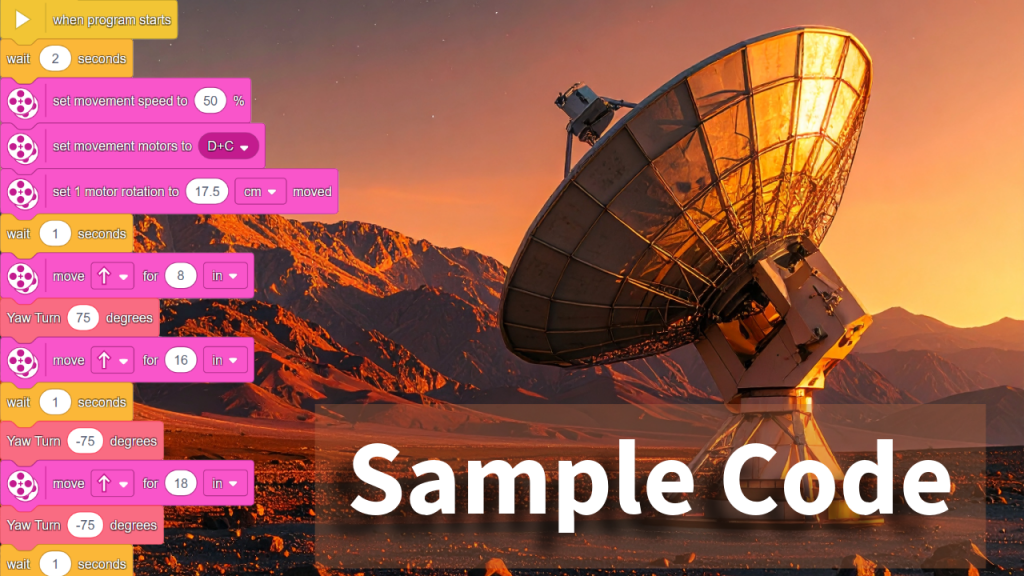
Step 3: Sample Code
Encourage students to fill in their exact measurements and calculated angles.
📺 Final Video Solution
Once students have built and programmed their rovers, they can watch the final completed mission. The video demonstrates a working solution—from navigation to block alignment to satellite activation and return to base.
“Mission Walkthrough” — Compare your approach with our at-home version
✅ Evaluation & Reflection
Self-Assessment:
Did your robot trigger the satellite reliably?
Was your code precise and consistent?
Did you work collaboratively and solve issues creatively?
Can you build a LEGO robot that acts like a real flower? Your robot should spin slowly to look for light, then stop when it finds the sun (or anything yellow)!
🌱 What Do Real Flowers Do?
Have you ever noticed how sunflowers turn to face the sun? That’s not just for fun—it’s a real plant behavior called phototropism.
🌞 Phototropism means:
Plants grow or move in response to light.
🌻 Sunflowers face east in the morning and follow the sun during the day.
🌿 The top of the plant grows faster on the shady side, which makes it bend toward light.
💡 Plants need light to make food through a process called photosynthesis.
💬 Fun Fact:
Some flowers stop turning once they’re grown, but younger ones still move every day!
🔧 Robot Build Instructions
You’ll build a flower that:
Spins using a motor
Looks like a flower using bricks and petals
Stops when the color sensor sees yellow or a bright light
🛠️ Step 1: Build the Spinning Base
Build a sturdy base and mount a motor horizontally so it can spin a platform. Make sure the whole thing doesn’t tip over when spinning!
We used the Twirling Teacups lesson as an introduction to a spinning base.
🪴 Step 2: Make the Stem
Use LEGO beams to make a vertical stem that connects your flower head to the spinning platform.
🌸 Step 3: Create the Flower
Your color sensor becomes the center of the flower. Decorate it with bright petals—but make sure it can still “see” colors in front of it!
💻 Coding the Robot
Use this basic idea for your code:
forever:
   Spin slowly
   If color sensor sees yellow or a bright light:
       Stop spinning
💡 Tip: You can use "wait until color sensor sees yellow" in your program, or detect brightness using the reflected light sensor mode.
🧪 Test Your Robot
Try these tests:
Shine a flashlight near the sensor. Does it stop?
Place a yellow object in front of it. Does it freeze?
Does it keep spinning if there’s no light or yellow?
Can you make it spin again after it stops?
🎨 Bonus Challenges
Decorate your flower with more petals, leaves, or a bug friend!
Make it change colors using lights when it stops.
Build a garden of robots and see how they all behave together!
📓 Record Your Learning
Use these questions in your science notebook:
Question
Your Answer
What is phototropism?
How does your robot behave like a real flower?
What does the sensor do in your robot?
What did you change during testing?
What would you do differently next time?
🌼 Share Your Build!
Take a photo or video of your robot in action and share it with your class or post with permission!
Mars Mission : Ice Collection Challenge
Mission Brief
You're an astronaut-robotics engineer stationed on Mars Base 7. A massive dust storm has just passed, revealing delicate ice crystals on the red surface. These crystals may hold the key to:
Evidence of past or present life
Essential water resources for future habitats
Fuel production and oxygen for return missions
But there's a problem: the crystals are too fragile to be picked up by normal grabbers. Your mission is to design a rover with a One‑Way Curtain to collect them safely and bring them home.
Tag us on social media with your rover—your build might be featured!
VENT Bot Maze Mission
A LEGO Spike Prime Challenge to Save the Mars Base
🚀 Your Mission
The Mars base has lost power. The lights are out. Systems are offline. The only way to reach the life support core is through a maze of narrow vents. Your job is to build and program a LEGO Spike Prime robot — codenamed VENT Bot — to navigate the maze and save the crew.
Watch this video about using the Gyro Sensor to make precise turns.
📏 Step-by-Step Instructions
Set up your maze using tape, tiles, or printed paths.
Test your robot: Can it move straight and turn consistently?
Use a ruler or tape measure to record distances between turns.
Use the gyro sensor to test turn angles (e.g., 90°, 45°).
Record your pseudocode for the entire maze path.
Translate your plan into a working program in the Spike app.
Test and revise — update your code until the robot can complete the maze!
🎯 Success Criteria
Robot completes the maze without hitting walls
Distances and turns are accurate
Code is organized and based on measured data
You used your pseudocode as a planning tool
🎥 Watch the Full Mission Video
See how the mission begins, how the robot is built and programmed, and how VENT Bot saves the Mars base! Leave us a comment on YouTube if you completed the mission!
How to Improve Robot Turns with LEGO Spike Prime – Using Yaw and the Scientific Method
Want to make your LEGO Spike Prime robot turn perfectly every time? Whether you're preparing for FIRST LEGO League or just want to build better bots, this step-by-step guide will help you fine-tune your robot’s turning using real data and the built-in Yaw sensor.
🔍 What You’ll Learn
What a Yaw sensor is and how it works
How to apply the Scientific Method to robot programming
Why robots overshoot turn angles at higher power levels
How to calculate and apply a correction offset
How to build smarter, more reliable turning code using My Blocks
🎥 Watch the Full Tutorial
🧭 What Is Yaw and Why Does It Matter?
Yaw measures your robot's rotation around the vertical axis—basically, how much it's turned left or right. The LEGO Spike Prime Hub tracks yaw from -180° to 179°, making it perfect for turn-based navigation.
But there's a catch: as motor power increases, so does inertia—which means your robot often overshoots the desired angle.
🔬 The Scientific Method for Better Turns
Here’s how we used the Scientific Method:
Ask a Question: Why does our robot overshoot 90° turns at higher power?
Form a Hypothesis: Higher power = more overshoot.
Conduct an Experiment:
Turn to 90° using different power levels (20%, 30%, 40%, 50%)
Run 5+ trials at each level
Record the actual stopping angle
Analyze Results:
Calculate average overshoot
Determine offset needed for accuracy
Apply & Test:
Modify your code to stop before the target angle
Improve My Block logic to factor in speed-based offset
📊 Example Data Table
Power %
Target Angle
Actual Avg. Angle
Offset Required
20%
90°
92°
-2°
40%
90°
97°
-7°
50%
90°
100°
-10°
Use this data to adjust your wait-until yaw angle block by subtracting the correct offset.
This is the code we will be modifying for the experiment.
🧱 Build a Smarter My Block
Create a custom My Block called YawTurn. It should:
Take input: angle,
Reset yaw
Estimate the offset based on power
Subtract offset from target angle
Wait until yaw = corrected angle
This makes your robot modular, reusable, and competition-ready.
✅ Why This Works for FLL and Classroom Robots
By controlling your turns with this method:
You’ll score higher in the Robot Game
Your robot will navigate missions with confidence
You’ll teach students real scientific inquiry through robotics
Have questions about your robot's turns? Drop them in the YouTube comments or email us directly!
About Preston Spratt your Robotics Instructor
Preston Spratt started Sprattronics to provide children with incredible learning opportunities. As a school principal, he has specialized in bringing project-based learning into schools. Sprattronics is a place for children to learn about the things that interest them and solve problems that excite them.
Parents should have a choice of what their children are learning, and that it can happen in a safe and welcoming environment. At Sprattronics, Greenville, South Carolina, we focus on children making discoveries and encourage them to explore the things that interest them.
Mastering Precise Turns with LEGO Spike Prime and the Yaw Sensor
Mastering Precise Turns with LEGO Spike Prime and the Yaw Sensor
Objective: Equip students with the knowledge and skills to utilize the Spike Prime Hub's Yaw sensor for accurate robot turns, leading to improved navigation and higher scores in competitions.
This lesson is available in a video format on YouTube.
Lesson Overview
Understanding the Yaw Sensor
Displaying Yaw Values on the Hub
Programming Precise In-Place Turns
Creating Reusable 'My Blocks' for Turns
Applying Skills in FLL Challenges
1. Understanding the Yaw Sensor
What is Yaw? Yaw refers to the robot’s rotation around the vertical axis—essentially, its ability to turn left or right in place.
Yaw Angle Range: The Spike Prime Hub measures yaw angles from -180° to 179°.
Positive values = Clockwise turn
Negative values = Counterclockwise turn
2. Displaying Yaw Values on the Hub
Goal: Use a variable to monitor the yaw angle in real time.
Steps:
Create a variable called Yaw.
Use a loop to continually update this variable.
Display the yaw value on the Hub.
Sample Pseudocode for Word Blocks:
When program starts
Set Yaw to 0
Forever
    Set Yaw to motion sensor yaw angle
    Display Yaw on Hub
3. Programming Precise In-Place Turns
Goal: Use Yaw data to turn exactly a desired number of degrees.
Steps:
Reset yaw angle to 0.
Start motors to rotate the robot.
Use wait until to stop when the desired yaw angle is reached.
Sample Code (Pseudocode for Word Blocks):
When program starts
Reset yaw angle to 0
Start motors: Left forward, Right backward
Wait until yaw angle is greater than 90
Stop motors
4. Creating Reusable 'My Blocks' for Turns
Goal: Make your code cleaner and more powerful with a custom block.
Steps:
Create a My Block called Turn Degrees with one input: angle.
Inside the block:
Reset the yaw angle.
Decide motor direction based on angle.
Rotate the robot.
Stop once yaw equals the input angle.
Sample Code (Pseudocode for Word Blocks):
Define 'Turn Degrees' with input 'angle'
Reset yaw angle to 0

If angle > 0
    Start motors: Left forward, Right backward
Else
    Start motors: Left backward, Right forward

Wait until  value of yaw =  value of 'angle'
Stop motors
5. Applying Skills in FLL Challenges
Benefits of Precise Turns:
✅ Better field alignment
✅ More reliable missions
✅ Easier to debug and reuse code
Practice Activity: Have students code the robot to drive in a square using four 90° turns, returning to the starting point.
The Quick Guide to Building a Home Education That Rivals Government Schools
(No Cost, No Stress, Just Results!)
🚀 Why Home Education?
The U.S. education system is falling behind. Test scores are dropping, teachers are leaving, and bureaucracy is winning over students. But here’s the good news: you don’t have to wait for the system to fix itself.
With the right tools, you can build a home education that’s more effective, engaging, and personalized—without spending a dime. This guide walks you through five essential (and free!) resources used by top-performing students worldwide.
✅ No research required – Just plug and play. ✅ No expensive curriculum – These tools are free! ✅ No complicated setup – Get started today.
📌 Step 1: The Five Essential Free Tools
(These resources cover core subjects and go beyond what most schools offer!)
1️⃣ NewsELA – Learn Through Real-World News
🔹 Best for: Reading comprehension, critical thinking 🔹 How it works: NewsELA adapts real-world news articles to different reading levels, making it easy for kids to learn about current events, history, and science. 🔹 Why it’s powerful: Unlike textbooks, which are outdated before they even hit the shelves, NewsELA keeps learning relevant.
🔹 Best for: Math, science, history, test prep 🔹 How it works: Students learn through expert-taught video lessons and practice problems that adjust to their skill level. 🔹 Why it’s powerful: It’s like having a private tutor—for free!
🔹 Best for: High schoolers & advanced learners 🔹 How it works: Provides full, free courses to prepare students for CLEP exams, which many colleges accept for credit. 🔹 Why it’s powerful: Your child could start earning college credits today—at no cost.
4️⃣ Your Local Library – The Secret of Self-Taught Geniuses
🔹 Best for: Self-directed learning, reading, research 🔹 How it works: Libraries provide thousands of free books, audiobooks, and online courses. 🔹 Why it’s powerful: Some of history’s greatest minds—Abraham Lincoln, Benjamin Franklin, and Elon Musk—were self-taught using books.
👉 Action Step: Visit your local library or check their digital resources!
5️⃣ Prodigy – A Math Game Kids Actually Want to Play
🔹 Best for: Math fluency, problem-solving 🔹 How it works: Prodigy turns math into a fun, role-playing game, where kids solve problems to level up. 🔹 Why it’s powerful: Kids love it, and it secretly makes them better at math.
Now that you have the tools, here’s how to structure a powerful home education program.
📅 Daily Schedule (Flexible & Effective!)
Using these resources, you can accomplish as much as a full day's worth of government school learning in just two hours. Build the day that works for you!
✅ Key Tip:Follow your child’s interests! The more engaged they are, the more they’ll learn.
📌 Step 3: Socialization & Enrichment
One of the biggest misconceptions about home education is that kids will be isolated. Here’s how to ensure they stay socially and academically engaged:
🔹 Join Homeschool Groups: Many local and online groups offer meetups, field trips, and co-ops. 🔹 Extracurricular Activities: Sports, music lessons, coding clubs, and art classes keep kids connected. 🔹 Community Engagement: Volunteering, internships, and apprenticeships provide real-world experience.
📌 Step 4: How to Track Progress Without the Bureaucracy
Traditional schools rely on standardized tests. But at home, you can use better methods to measure real learning.
✅ Portfolio: Keep samples of writing, projects, and creative work. ✅ Progress Logs: Track subjects studied, skills mastered, and milestones achieved. ✅ Real-World Application: If your child can teach it, they truly understand it!
💡 Remember: Learning isn’t about memorizing facts for a test—it’s about mastering skills for life.
🎯 Final Thoughts: You Have Everything You Need!
By using these five free tools and structuring a flexible, engaging learning experience, you can build an education at home that rivals (or even surpasses) government schools.
📌 Which resource are you most excited to try? Let us know in the comments below!
👉 Want more step-by-step guidance? Subscribe to our YouTube channel for more homeschool strategies and free education tools!
🚀 The future of education is in your hands. Let’s make it better!
Geo-Fencing Removed: Fly Anywhere and Five Great Ways to Get in Trouble
This blog post is available in video format on YouTube.
Introduction
If you’re a DJI drone operator, you may have noticed a major change recently. Just days after we released a video on how to geo-unlock your DJI drone, DJI announced that they’ve lifted geofencing restrictions across the United States. This is a significant shift aimed at aligning their systems more closely with FAA guidelines and ensuring that responsibility for compliance falls squarely on the pilot.
So, what does this mean for drone enthusiasts? Essentially, DJI drones now allow you to take off and fly almost anywhere, within technical limitations. However, this newfound freedom doesn’t absolve you of responsibility—you’ll still face the consequences if you break FAA regulations.
In this post, we’ll cover:
What the change to DJI’s maps looks like.
How to ensure you’re still flying legally and responsibly.
Real-world examples of what happens when drone pilots push the boundaries and get into trouble with the FAA.
Let’s dive in.
How the Maps Have Changed
Until January 13, 2025, DJI’s maps were layered with multiple types of flight restrictions. For example, a single location—like your local park—might fall into multiple restricted zones, including:
Authorization Zones: These appeared in blue and required pilots to unlock them using a verified DJI account.
Altitude Zones: Gray areas on the map where flight height was limited, such as near airports.
Warning Zones: These zones triggered warnings in the DJI app but didn’t necessarily prevent flights.
Enhanced Warning Zones: These zones required users to unlock them in-app but didn’t need a verified account or internet connection.
Restricted Zones: These red zones completely prohibited flight unless special permission was granted by DJI through an online unlocking request.
For instance, at my local park, I used to deal with an authorization zone, a 196-ft altitude limit zone, an enhanced warning zone, and a general warning zone. We had to get LAANC approval to fly and submit a DJO Geo Unlock request just take off in an area where the FAA says we can fly up to 400 feet.
Now, with geofencing removed, DJI no longer enforces these zones, meaning your drone will no longer prevent you from taking off or flying through these areas. Instead, it’s now entirely your responsibility to comply with FAA airspace rules.
How to Load the New Maps on DJI Fly
Update the DJI FlySafe Database
Make sure your drone and app are running the latest firmware and database updates. This will ensure the map reflects the new geofencing changes.
You can do this by clicking PROFILE --> Settings --> Check for FlySafe Database Updates
Use FAA Approved Apps
We love AutoPylot. It is B4UFly approved, has up-to-date FAA maps and restrictions, and allows for instant LAANC approvals.
Five Ways to Get in Trouble with the FAA
While the removal of DJI’s geofencing simplifies flying, it’s crucial to stay within FAA regulations. Here are five ways to land yourself in hot water:
1. Flying in Restricted Airspace
Just because DJI won’t stop you doesn’t mean you can ignore airspace restrictions. Flying near airports, military bases, or in prohibited zones without prior FAA authorization can result in hefty fines.
2. Flying Without the Correct Certification
If you’re flying recreationally, you need to pass the TRUST test (The Recreational UAS Safety Test). For commercial use, you must hold a Part 107 Remote Pilot Certificate. Operating without the appropriate credentials can lead to penalties.
3. Flying Over People
FAA rules prohibit flying drones directly over people unless specific waivers or safety conditions are met. This is especially critical in populated areas or events.
4. Not Yielding to Manned Aircraft
Drones must always give way to manned aircraft. Failing to yield to planes, helicopters, or emergency response aircraft could result in severe penalties and risks to safety.
5. Flying Above 400 Feet
The FAA’s maximum altitude for drones is 400 feet above ground level (AGL) in most areas. Exceeding this limit can interfere with manned aviation and result in fines or other legal action.
Final Thoughts
The removal of DJI’s geofencing system represents a shift in responsibility from the drone manufacturer to the pilot. While this change offers greater freedom, it also means that you must be diligent about understanding and following FAA regulations.
Before taking off, make sure you:
Use apps like AutoPylot to check for airspace restrictions.
Stay under 400 feet.
Avoid flying over people or in restricted areas.
Keep your certifications up to date.
Flying a drone can be an incredible hobby or a valuable tool for commercial work—but with great power comes great responsibility. By following the rules and respecting airspace, you can ensure your flights are safe, legal, and trouble-free.