Code a Mini Economy Town in Scratch

Development Guide: Code a Mini Economy Town in Scratch

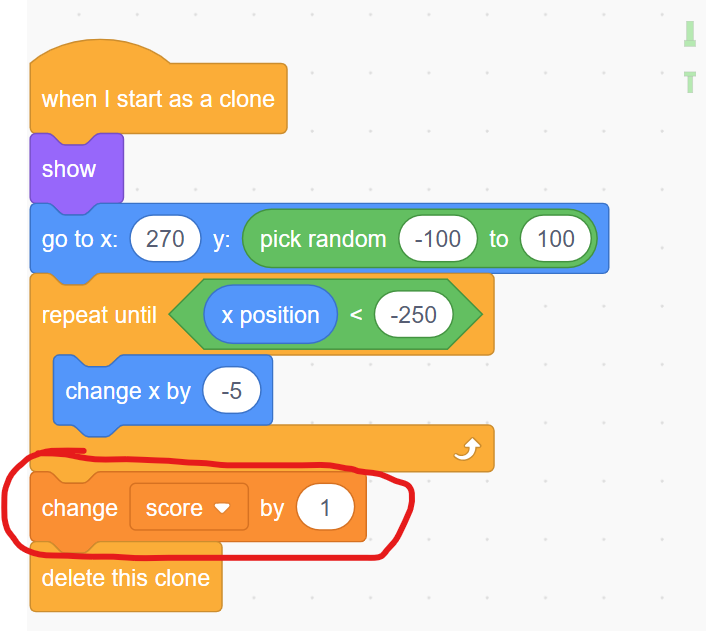
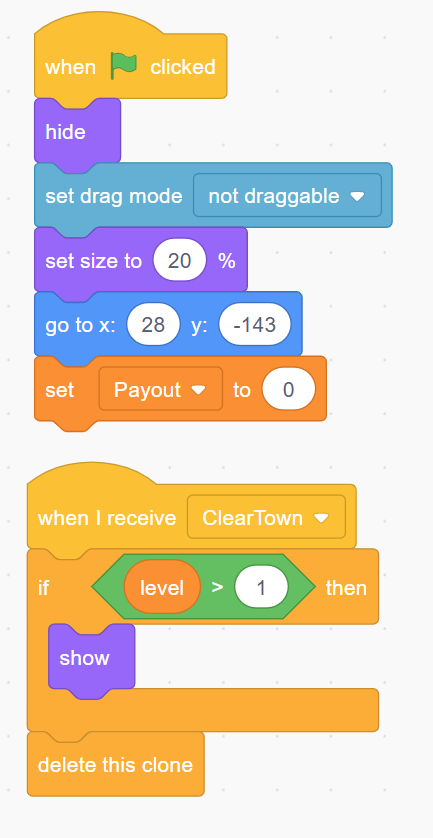
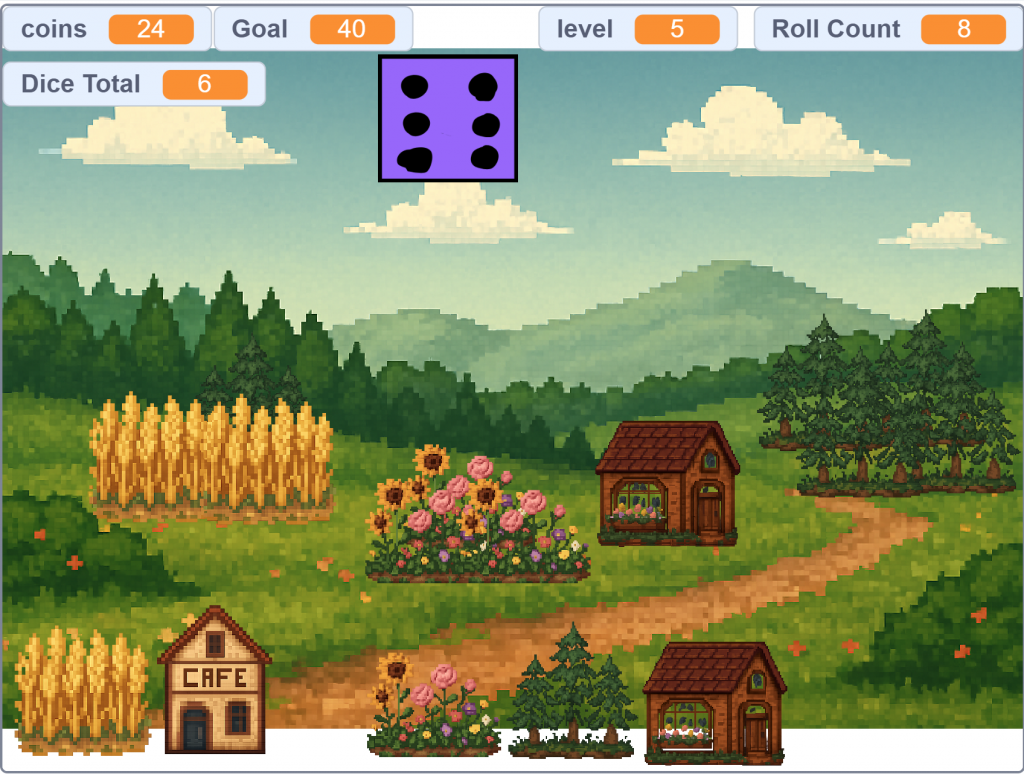
This guide explains how to build a dice-powered city simulator in Scratch. You will learn how to manage a virtual economy, use cloning to build a visual city, and create a multi-level progression system.

You can check out this project on Scratch. Dicy City Scratch

We made a more polished version here. Check out the YouTube video below.


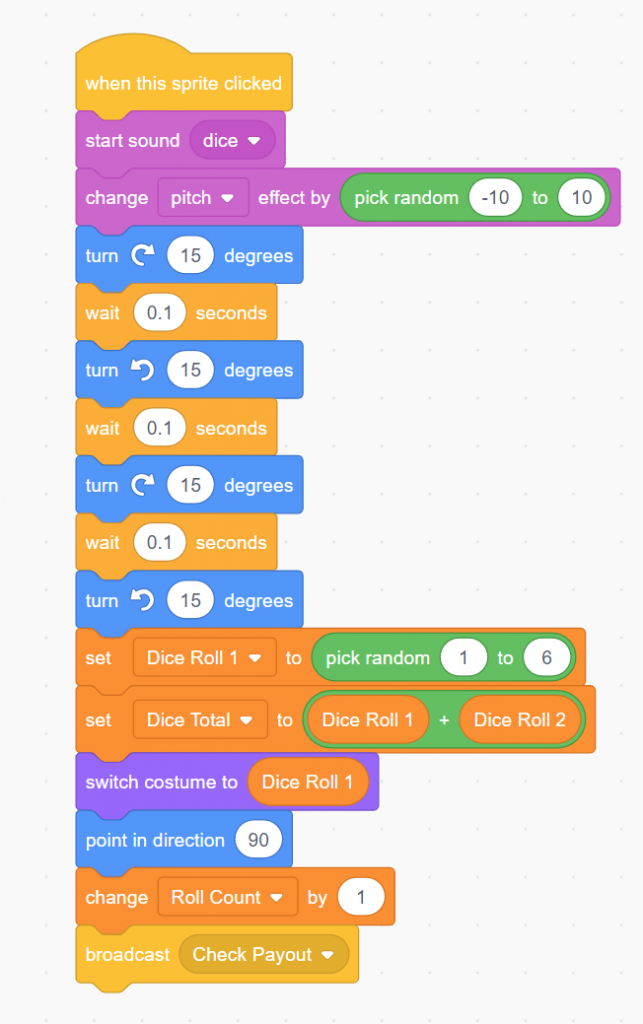
Step 1: The Economy Engine

The Goal: Create a dice-rolling mechanic that generates money.

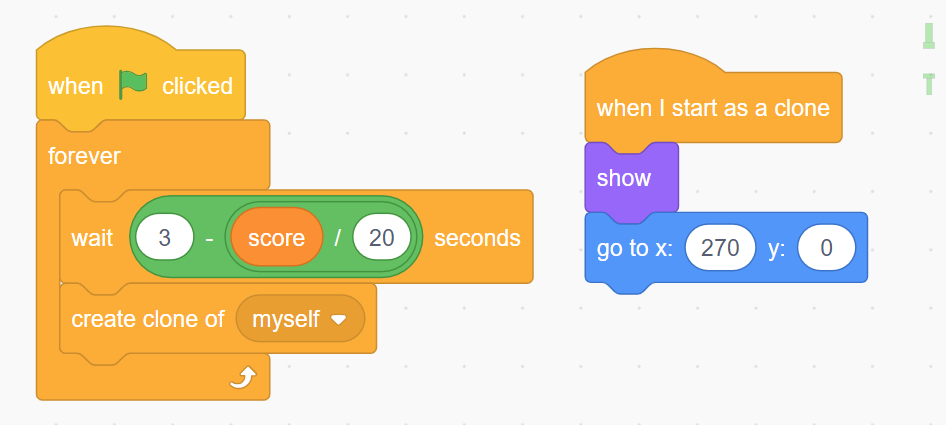
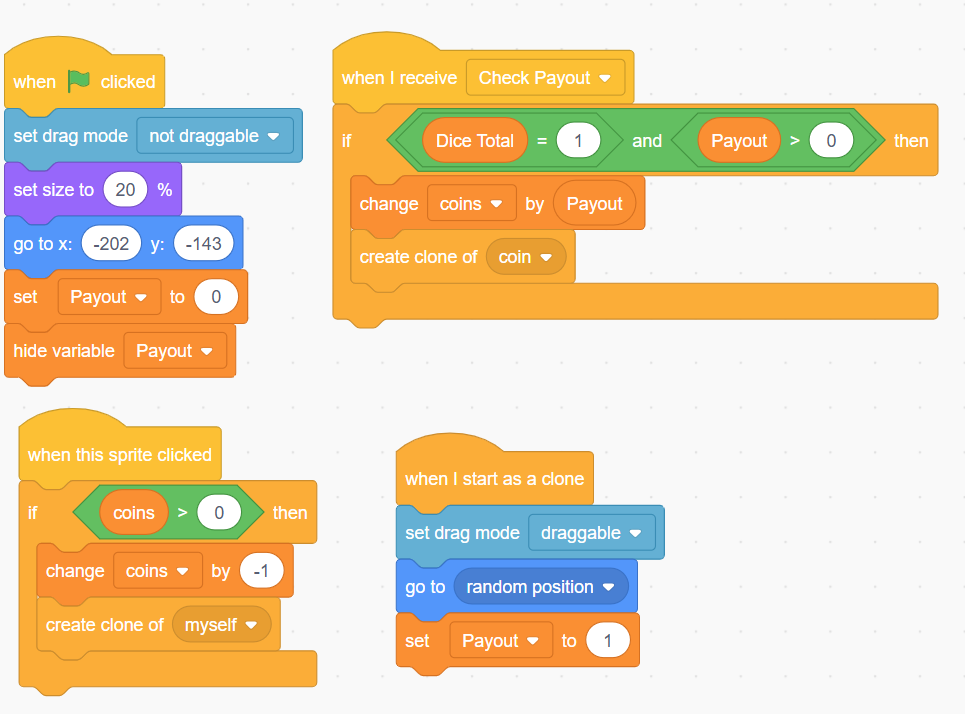
Step 2: Visual City Building (Cloning)

The Goal: Make buildings appear on the screen when you buy them.

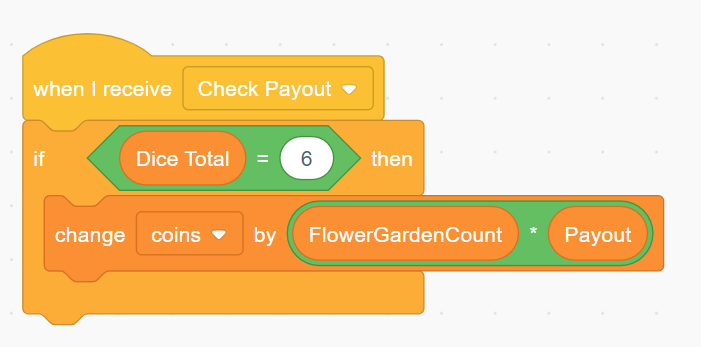
Step 3: Strategic Synergies (Math Operators)

The Goal: Create advanced buildings that give bonuses based on other buildings you own.

Step 4: Level Progression & Resets

The Goal: Create a sense of achievement by unlocking new items and clearing the board for a new challenge.

Step 5: Adding Visual "Juice"

The Goal: Use motion to show the player exactly when and where they are earning money.


Summary of Logic

By the end of this project, you have mastered:

  1. Events: Using broadcasts to coordinate between the dice, the shop, and the city.
  2. Cloning: Managing dozens of visual objects without creating dozens of separate sprites.
  3. Conditionals: Checking if a player has enough money or has reached the correct level to proceed.
  4. Math Operators: Creating complex economic bonuses that make the game strategic.

Code a Town Economy Game


Code a Mini Economy Town: A Development Guide

This guide breaks down the creation of Dice City Tycoon, a browser-based economic simulator. We developed this game in five distinct phases, moving from a simple text-based engine to a polished, multi-level city builder.

This page is all about building the game in HTML for a Web Browser. This is where I like to prototype my games before building a polished version in a game engine.

A Scratch Version of this Guide is available.


Phase 1: The Core Engine (Randomized Income)

Objective: Establish the "Game Loop." We needed a way for the player to spend money (Input) and earn it back through luck (Output).

Phase 2: Visual Feedback (The Emoji City)

Objective: Make the game feel like a "City Builder" rather than just a spreadsheet. We wanted the player to see their progress physically.

Phase 3: Strategic Depth (Synergy Buildings)

Objective: Move beyond simple payouts and introduce strategy. We wanted buildings that "talk" to each other.

Phase 4: The Progression System (Levels & Unlocks)

Objective: Prevent the player from being overwhelmed and create long-term goals.

Phase 5: Polish & "Juice" (Animations & Resets)

Objective: Make the game feel professional and implement a "Prestige" loop where the game gets harder but more rewarding.


Final Project Architecture Summary

  1. HTML: Provides the skeleton (the city field and the control sidebar).
  2. CSS: Handles the "Vibe" (grass colors, dirt borders, and button styling).
  3. JavaScript: Acts as the brain, managing the level logic, coin math, and animations.

Key takeaway: By starting with a simple dice roll and layering on visuals, strategy, and then progression, you can build a complex simulation starting from just a few lines of code.

Create a Downhill Skier Game

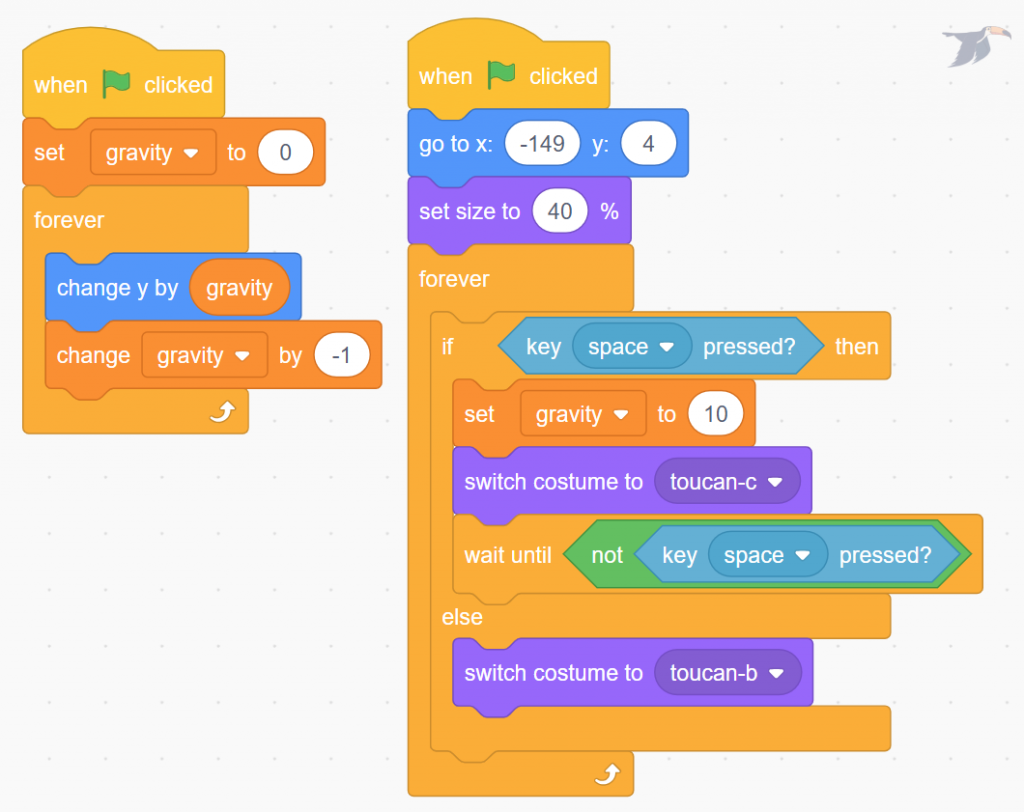
DOWNHILL SKIER GAME CODING CHALLENGE

The Challenge

Your mission is to create a downhill skiing game.
The skier stays near the top of the screen while the world moves toward them.

Goal:
Avoid obstacles for as long as possible.

This game uses a classic trick in game design:
If the environment moves, it feels like the player is moving.


The Big Idea

Even though it looks like the skier is racing downhill:

Obstacles can include:

Play our html version of the game.


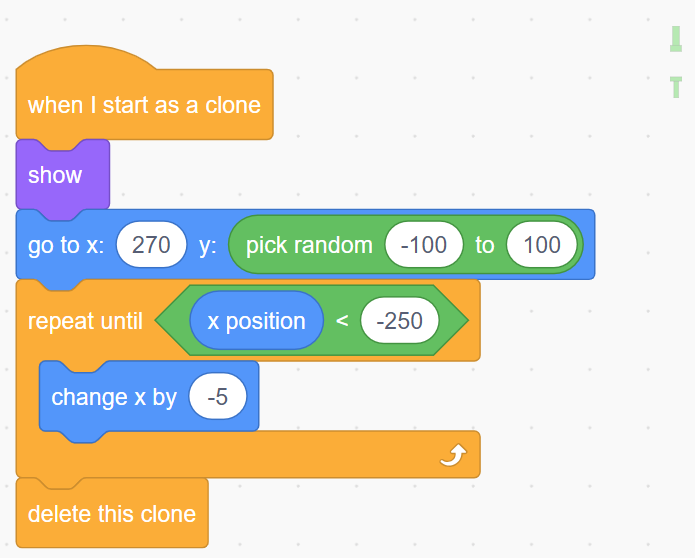
Step 1: Create Your Skier (Player Sprite)

Start with your skier — this is your avatar.

Requirements:

Tip #1: Player Movement

Think carefully about how the skier should move.

You might:

There is no single correct solution — choose what feels best for your game.


Step 2: Add Your First Obstacle

Obstacles create the challenge.

Start simple:

  1. Create one obstacle
  2. Spawn it at the bottom of the screen
  3. Move it up the screen toward the skier
  4. When it goes off screen, reset it to the bottom

Tip #2: One Obstacle First

Do not add everything at once.


Step 3: Create the Downhill Illusion

The skier does not move downhill — the obstacles do.

Obstacle Rules:

Tip #3: Keep the Physics Simple

Simple movement makes debugging easier.

This keeps the focus on gameplay, not complex math.


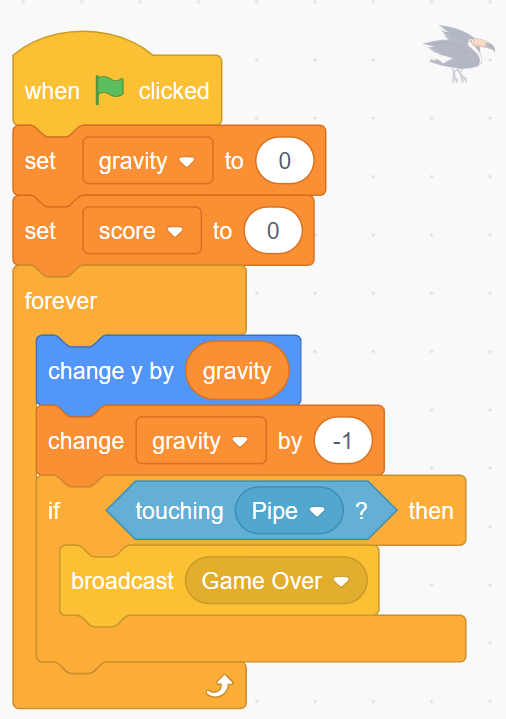
Step 4: The Game Loop

Every frame, your game should:

  1. Move the skier left or right
  2. Move obstacles upward
  3. Check for collisions
  4. Repeat

This loop continues until the skier hits an obstacle.

Check out our MakeCode Arcade Version of the Game!


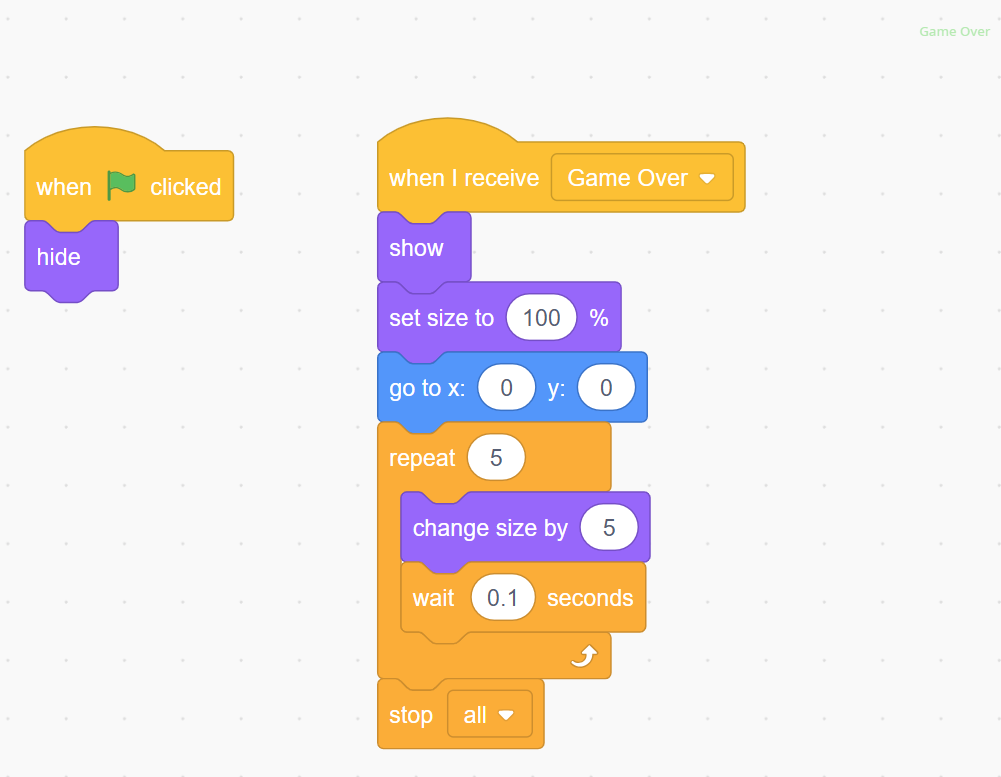
Game Over

When the skier touches an obstacle:


Extension Challenges (Optional)

Want to take your game further?

Try adding:


Final Thought

Start small. Test often.
Every great game begins with something simple.

Happy coding.

Sarah E. Goode LEGO Folding Desk to Bed Build

Overview

Design a LEGO build that transforms from a desk into a bed, inspired by Sarah E. Goode’s folding cabinet bed. This challenge highlights how engineers solve real problems—like limited living space—by creating furniture that serves multiple purposes.

Watch the full build video: https://youtu.be/h9pIRXLIa8w

Best for: Grades 2–6
Kits: LEGO Spike Prime or Spike Essential
Time: 45–60 minutes


Who Was Sarah E. Goode?

Sarah E. Goode was an inventor and furniture store owner who lived in the late 1800s. As cities grew, many families lived in very small apartments with limited space. Sarah noticed that people needed furniture that could do more than one job.

Her solution was a folding cabinet bed—a piece of furniture that could be used during the day and transformed into a bed at night. She became one of the first Black women to receive a U.S. patent.

Big idea: Good design makes life easier by solving everyday problems.
This image is an AI enhancement of the blurry photograph.


Real Invention: Key Features

Sarah Goode’s folding cabinet bed needed to:

This invention helped families live more comfortably in tight spaces.

LEGO Robot Challenge

Your mission: Build and program a LEGO model that transforms from a desk into a bed using motion and structure.
Build Requirements

Optional Add-Ons


Suggested Materials


Programming Concepts

Extension: Use conditionals so the build only transforms when it is safe.


Discussion Questions


Learning Objectives

Students will:


Extensions & Challenges


Video Connection

🎥 Watch the full build video: https://youtu.be/h9pIRXLIa8w


Part of the Black History LEGO Robotics Series

This build is part of our Black History LEGO Robotics Challenge—exploring inventors, engineers, and innovators through hands-on LEGO robotics.

What problem would you solve with transforming furniture?

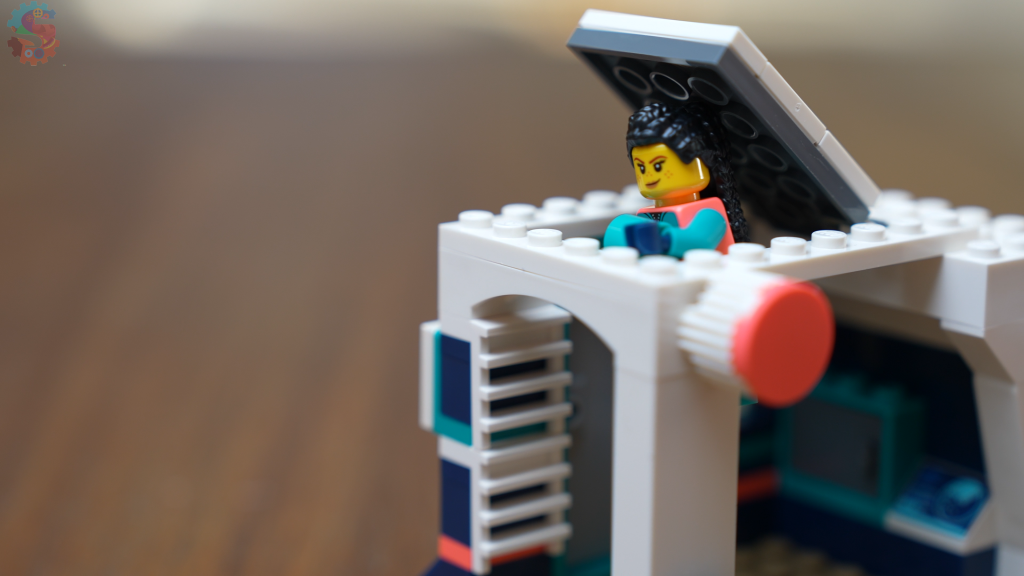
Alexander Miles - LEGO Spike Automatic Door Build

Overview

Build a LEGO robot that opens and closes a door automatically—no hands required. This challenge is inspired by Alexander Miles, the inventor whose automatic elevator door system made buildings safer and helped shape modern cities.

Watch the full build video: https://youtu.be/CT-ELr0o-v0

Best for: Grades 2–6
Kits: LEGO Spike Prime or Spike Essential
Time: 45–60 minutes


Who Was Alexander Miles?

Alexander Miles was an inventor who noticed a serious safety problem in the late 1800s: elevator doors were often left open by mistake, leading to dangerous accidents. After a close call himself, Miles designed an automatic elevator door system that opened and closed on its own. His invention reduced human error and made elevators much safer to use.

Big idea: Automation can protect people by removing dangerous human mistakes.


Real Invention: Key Features

Alexander Miles’s automatic door system needed to:

These ideas are still used in modern elevators and automatic doors today.


LEGO Robot Challenge

Your mission: Design and program a LEGO door that opens when someone approaches and closes automatically after a short delay.

Build Requirements

Optional Add-Ons


Suggested Materials


Programming Concepts

Extension: Add conditionals so the door stays open while someone is detected.


Discussion Questions


Learning Objectives

Students will:


Extensions & Challenges


Video Connection

🎥 Watch the full build video: https://youtu.be/CT-ELr0o-v0


Part of the Black History LEGO Robotics Series

This build is part of our Black History LEGO Robotics Challenge—exploring inventors, engineers, and innovators through hands-on LEGO robotics.

What will you automate next?

Garrett Morgan LEGO Traffic Signal Build

Build a working LEGO traffic signal inspired by Garrett Morgan, the inventor whose improved traffic light design helped make roads safer. In this challenge, students design a motorized signal system, learn why timing and clear communication matter, and connect history to real engineering decisions.

Watch the Video! Click Here

Who Was Garrett Morgan?

Garrett Morgan was an inventor and entrepreneur who saw a dangerous problem on early 1900s streets—cars, horses, and pedestrians all competing for space. After witnessing a serious accident, he designed an improved traffic signal that warned drivers before it was time to stop. His ideas laid the foundation for modern traffic lights and saved countless lives.

Big idea: Engineering starts with noticing a problem and designing a safer solution.

Real Invention: Key Features

Morgan’s traffic signal needed to:

LEGO Robot Challenge

Your mission: Build a LEGO traffic signal that controls movement using timing and visual signals.

Build Requirements

Optional Add‑Ons


Suggested Materials


Programming Concepts

Extension: Add conditionals to handle pedestrian crossings.

Discussion Questions


Learning Objectives

Students will:


Extensions & Challenges


Video Connection

🎥 Watch the full build video: https://youtu.be/o2VpeirX9PY

Read More About Garrett Morgan

After spending four years in Cincinnati, in 1895 Morgan moved to Cleveland, where he took a job sweeping floors at the Roots and McBride Co. Over time, he grew familiar with the company’s sewing machines, teaching himself how to operate and repair them. Not only did Morgan become a skilled machinist, but he also found inspiration for his first invention — a belt fastener for sewing machines.

In 1907, Morgan started his own business where he repaired and sold sewing machines. Two years later he opened a tailor shop: The Morgan Skirt Factory. While his wife Mary sewed clothes, Morgan built and maintained the sewing machines. He also began experimenting with a liquid for polishing sewing machine needles, preventing them from burning fabric as they sewed. When he discovered the liquid also could straighten hair, he used it to develop a hair cream, and he soon established the G. A. Morgan Hair Refining Co. Morgan then began investing his profits into developing more inventions.

Morgan found the motivation to develop one of his most impactful inventions when he learned about the devastating Triangle Shirtwaist Co. fire that caused the deaths of 146 garment workers in New York City in 1911. Understanding that the firefighters had struggled with smoke inhalation, Morgan began to devise a solution. In 1912, he filed for a patent on his breathing device, a “safety hood” that was designed to give a first responder the ability to “supply himself at will with fresh air from near the floor [and] at the same time forcibly remove smoke or injurious gases from the air tube.” Two years later, he established the National Safety Device Co.

In 1916, the importance of Morgan’s safety hood invention was demonstrated at the site of a tragic accident in Cleveland. Following an explosion at the Cleveland Waterworks that killed 18 workers, survivors were trapped as a gas-filled tunnel collapsed under Lake Erie. Without effective safety equipment, rescuers had been unable to reach them because smoke, dust and fumes blocked their way. But when some volunteers — including Morgan himself — put on safety hoods, they were able to successfully reach and rescue several survivors.

Despite his invention’s obvious lifesaving potential, Morgan found difficulty in selling his safety hood to white fire chiefs who refused to buy products from a Black inventor. In response, Morgan sought the advice of the famous entrepreneur J.P. Morgan, who suggested he remove his first name from the product. Following this advice, the inventor began calling his device the “Morgan Safety Hood.” He also hired white actors to promote the product at conventions, helping him to avoid racist objections. Morgan’s new marketing strategies worked, and fire departments across the country finally began to buy his early gas masks.

By the 1920s, Morgan had established himself as a successful businessman and had purchased an automobile. While driving through Cleveland one day, he witnessed a collision between a horse-drawn carriage and another vehicle at an intersection. This experience compelled Morgan to once again use his talents and skills to develop an invention that would improve the safety and welfare of his fellow citizens.

Mission to Mars LEGO Robotics Unit

Building a Mars Rover with LEGO Robotics

A rover is an automated motor vehicle that propels itself across the surface of a celestial body. A rover may examine territory and interesting features, analyze weather conditions, or even test materials, such as soil and water.

What does it take to go to Mars?

People have long been fascinated by Mars, the planet in our solar system that’s most like Earth. Uncrewed missions have sent orbiters, probes, and rovers to explore the planet since the 1960s, but what would it take to carry out a successful human mission to Mars?

Mission Mars Unit Overview

In this unit, your students will work as scientists and engineers. They’ll immerse themselves in motivating STEM activities that prompt creative problem-solving, communication, and exploration.

Mission: Activate Communications

Mars Mission : Activate Communications - Sprattronics

Mission: Vent Bot

VENT Bot Maze Mission - Sprattronics

Mission: Ice Collection

Mars Mission : Ice Collection Challenge - Sprattronics

Mission: Rocket Launcher

Lesson Video

Step by Step Build Directions

Mission: Supply your Base

Robot Rabbits vs. Pythons LEGO Spike Engineering

Download this as a PDF to use in class or at home!

Today you are an engineer! Your mission is to design and build a robot rabbit that can move in a rabbit-like way. We’ll use the Engineering Design Process:

Challenge → Brainstorm → Design → Create → Test → Improve → Share

Real-World Context: In Florida’s Everglades, invasive Burmese pythons hurt native wildlife. Engineers experiment with “robot rabbits” to lure and safely capture pythons so scientists can protect other animals.
Your goal: Build a rabbit-like robot that shows realistic motion (hopping, moving forward, or “being interesting” to a predator) and can keep moving without falling apart.

Challenge

Deep in the Florida Everglades, something unusual is hopping into action. It’s not a real rabbit—it’s a robot bunny! And this little machine has a big job: helping scientists fight one of the Everglades’ most dangerous invaders, the Burmese python.

Why Pythons Are a Big Problem

Burmese pythons are not supposed to live in Florida. They came to the U.S. as pets in the 1970s, but some were released into the wild. By the 1980s, they were living and breeding in the Everglades.

These snakes are huge—some grow over 18 feet long—and they eat almost anything they can catch. That includes raccoons, rabbits, opossums, bobcats, and even deer.

Scientists found that in parts of the Everglades, mammal populations have dropped by more than 90%. For example, marsh rabbits, a favorite python snack, have nearly disappeared. With so many animals gone, the entire ecosystem is out of balance.

Today, there may be tens of thousands of Burmese pythons in Florida, and they’re spreading farther north each year.

The Idea of Robot Rabbits

To stop the pythons, researchers at the University of Florida came up with a creative plan: build fake rabbits that trick the snakes.

These aren’t ordinary toys. Each robo-bunny is stuffed with special electronics:

From far away, they look just like marsh rabbits—the kind pythons love to eat.

When a python slithers near, the robot alerts the research team. The hope is that the snakes can then be caught before they eat more of Florida’s wildlife.

Why Not Use Real Rabbits?

Scientists tried that years ago. They placed live rabbits in pens, and pythons showed up almost every week. But caring for live animals across the huge Everglades was too difficult and not very kind to the rabbits.

The robo-bunnies solve that problem. They can survive in water, mud, and rain, and they don’t need food or care. Some researchers are even testing if adding rabbit scent will make the robots more convincing.

Other Ways Florida Fights Pythons

Robot rabbits aren’t the only strategy. Florida has tried many ways to reduce the python population, including:

Even with these efforts, the snakes are still winning. That’s why scientists are excited to try bold ideas—like robo-bunnies.

Could Robo-Bunnies Save the Day?

The project is still in its early stages. Right now, scientists are testing 40 robo-bunnies in different areas of South Florida. If they work, they could help hunters find more pythons, faster, and bring back balance to the Everglades.

It may sound a little silly to fight giant snakes with toy rabbits. But sometimes, solving big problems requires small, creative solutions.

As one scientist put it: “After 10 years of studying the problem, you don’t just want to watch it happen—you want to do something.”

And maybe, just maybe, robo-bunnies are the heroes the Everglades have been waiting for.

Brainstorm

Come up with ideas on how to solve the problem.

List or sketch 3 different features that are important to include with our robot.

Parts or mechanisms we might try (check any):
☐ Legs with hinges ☐ Wheels as “feet” ☐ Cams/lifters ☐ Rubber band power
☐ Gear train ☐ Counterweights ☐ Tail/ears for balance

Design

Sketch out your robot plan. What parts do you think you will need to make your rabbit a reality?

Create

Build your robot using the materials you have. You can build a robot rabbit using a LEGO Spike Essential Kit, a LEGO Spike Prime Kit, or just LEGOs you have with you.

Build checklist:
☐ Frame is sturdy
☐ Moving parts don’t jam
☐ Battery/motor (if used) is secured
☐ Nothing sharp or loose

Test

Try out your LEGO Robot to see if it works.

Mark a start line and a goal line. Clear the path.

Run your trials and record results:

TrialWent Straight? (Y/N)Distance (cm)Stayed Together? (Y/N)Notes
1
2
3

Did it meet your success criteria?
☐ Yes  ☐ Not yet

Improve

Make changes to make your robot rabbit work better.

What didn’t work the way we wanted?


Change we will try:


Why we think it will help:


Re-test results (pick one):
☐ Better ☐ Same ☐ Worse

Our robot did not hop correctly. We changed our code to make it hop in a more bunny-like manner. Another problem we faced was that the snakes hunt by temperature and scent detection. Adding a "Hot Hands" and some rabbit spray to our bot, it made the snake more likely to approach.

Share

Name of our robot rabbit: _______________________________________

How it works (in one or two sentences):


What we’re proud of: _____________________________________________

What we would try next time: ______________________________________

Share your robot in the comments on our YouTube page!

Reflection (Optional)

One thing I learned about engineering: ______________________________

One thing I learned about invasive species: __________________________

A new idea I want to try: __________________________________________


Quick Checklist

☐ I completed all 7 steps
☐ I tested at least 3 times
☐ I improved my design
☐ I can explain how my robot works

A robot rabbit stands near a snake with its mouth open

How to Improve Robot Turns with LEGO Spike Prime – Using Yaw and the Scientific Method

Want to make your LEGO Spike Prime robot turn perfectly every time? Whether you're preparing for FIRST LEGO League or just want to build better bots, this step-by-step guide will help you fine-tune your robot’s turning using real data and the built-in Yaw sensor.


🔍 What You’ll Learn


🎥 Watch the Full Tutorial


🧭 What Is Yaw and Why Does It Matter?

Yaw measures your robot's rotation around the vertical axis—basically, how much it's turned left or right. The LEGO Spike Prime Hub tracks yaw from -180° to 179°, making it perfect for turn-based navigation.

But there's a catch: as motor power increases, so does inertia—which means your robot often overshoots the desired angle.


🔬 The Scientific Method for Better Turns

Here’s how we used the Scientific Method:

  1. Ask a Question: Why does our robot overshoot 90° turns at higher power?
  2. Form a Hypothesis: Higher power = more overshoot.
  3. Conduct an Experiment:
    • Turn to 90° using different power levels (20%, 30%, 40%, 50%)
    • Run 5+ trials at each level
    • Record the actual stopping angle
  4. Analyze Results:
    • Calculate average overshoot
    • Determine offset needed for accuracy
  5. Apply & Test:
    • Modify your code to stop before the target angle
    • Improve My Block logic to factor in speed-based offset

📊 Example Data Table

Power %Target AngleActual Avg. AngleOffset Required
20%90°92°-2°
40%90°97°-7°
50%90°100°-10°

Use this data to adjust your wait-until yaw angle block by subtracting the correct offset.

This is the code we will be modifying for the experiment.


🧱 Build a Smarter My Block

Create a custom My Block called YawTurn. It should:

This makes your robot modular, reusable, and competition-ready.


✅ Why This Works for FLL and Classroom Robots

By controlling your turns with this method:


📥 Get the Lesson PDF + Sample Code

Download:


🔑 Learning Targets


💬 Leave a Comment or Question

Have questions about your robot's turns? Drop them in the YouTube comments or email us directly!

About Preston Spratt your Robotics Instructor

Preston Spratt started Sprattronics to provide children with incredible learning opportunities. As a school principal, he has specialized in bringing project-based learning into schools. Sprattronics is a place for children to learn about the things that interest them and solve problems that excite them.

Parents should have a choice of what their children are learning, and that it can happen in a safe and welcoming environment. At Sprattronics, Greenville, South Carolina, we focus on children making discoveries and encourage them to explore the things that interest them.

Geo-Fencing Removed: Fly Anywhere and Five Great Ways to Get in Trouble

This blog post is available in video format on YouTube.

Introduction

If you’re a DJI drone operator, you may have noticed a major change recently. Just days after we released a video on how to geo-unlock your DJI drone, DJI announced that they’ve lifted geofencing restrictions across the United States. This is a significant shift aimed at aligning their systems more closely with FAA guidelines and ensuring that responsibility for compliance falls squarely on the pilot.

DJI Mini 3 and Preston Spratt

So, what does this mean for drone enthusiasts? Essentially, DJI drones now allow you to take off and fly almost anywhere, within technical limitations. However, this newfound freedom doesn’t absolve you of responsibility—you’ll still face the consequences if you break FAA regulations.

In this post, we’ll cover:

  1. What the change to DJI’s maps looks like.
  2. How to ensure you’re still flying legally and responsibly.
  3. Real-world examples of what happens when drone pilots push the boundaries and get into trouble with the FAA.

Let’s dive in.


How the Maps Have Changed

Until January 13, 2025, DJI’s maps were layered with multiple types of flight restrictions. For example, a single location—like your local park—might fall into multiple restricted zones, including:

For instance, at my local park, I used to deal with an authorization zone, a 196-ft altitude limit zone, an enhanced warning zone, and a general warning zone. We had to get LAANC approval to fly and submit a DJO Geo Unlock request just take off in an area where the FAA says we can fly up to 400 feet.

Now, with geofencing removed, DJI no longer enforces these zones, meaning your drone will no longer prevent you from taking off or flying through these areas. Instead, it’s now entirely your responsibility to comply with FAA airspace rules.


How to Load the New Maps on DJI Fly

Update the DJI FlySafe Database

Make sure your drone and app are running the latest firmware and database updates. This will ensure the map reflects the new geofencing changes.

You can do this by clicking PROFILE --> Settings --> Check for FlySafe Database Updates


Use FAA Approved Apps

We love AutoPylot. It is B4UFly approved, has up-to-date FAA maps and restrictions, and allows for instant LAANC approvals.

Five Ways to Get in Trouble with the FAA

While the removal of DJI’s geofencing simplifies flying, it’s crucial to stay within FAA regulations. Here are five ways to land yourself in hot water:

1. Flying in Restricted Airspace

Just because DJI won’t stop you doesn’t mean you can ignore airspace restrictions. Flying near airports, military bases, or in prohibited zones without prior FAA authorization can result in hefty fines.

2. Flying Without the Correct Certification

If you’re flying recreationally, you need to pass the TRUST test (The Recreational UAS Safety Test). For commercial use, you must hold a Part 107 Remote Pilot Certificate. Operating without the appropriate credentials can lead to penalties.

3. Flying Over People

FAA rules prohibit flying drones directly over people unless specific waivers or safety conditions are met. This is especially critical in populated areas or events.

4. Not Yielding to Manned Aircraft

Drones must always give way to manned aircraft. Failing to yield to planes, helicopters, or emergency response aircraft could result in severe penalties and risks to safety.

5. Flying Above 400 Feet

The FAA’s maximum altitude for drones is 400 feet above ground level (AGL) in most areas. Exceeding this limit can interfere with manned aviation and result in fines or other legal action.


Final Thoughts

The removal of DJI’s geofencing system represents a shift in responsibility from the drone manufacturer to the pilot. While this change offers greater freedom, it also means that you must be diligent about understanding and following FAA regulations.

Before taking off, make sure you:

Flying a drone can be an incredible hobby or a valuable tool for commercial work—but with great power comes great responsibility. By following the rules and respecting airspace, you can ensure your flights are safe, legal, and trouble-free.