February 20, 2026

Create a Downhill Skier Game

DOWNHILL SKIER GAME CODING CHALLENGE

The Challenge

Your mission is to create a downhill skiing game.
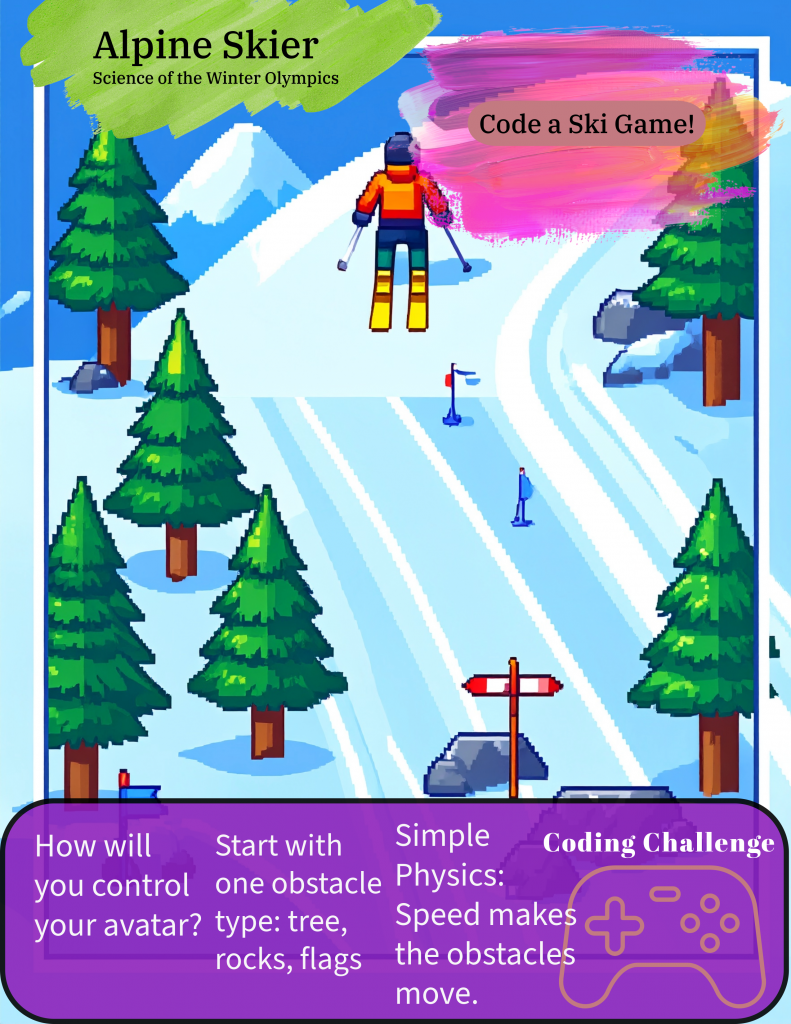
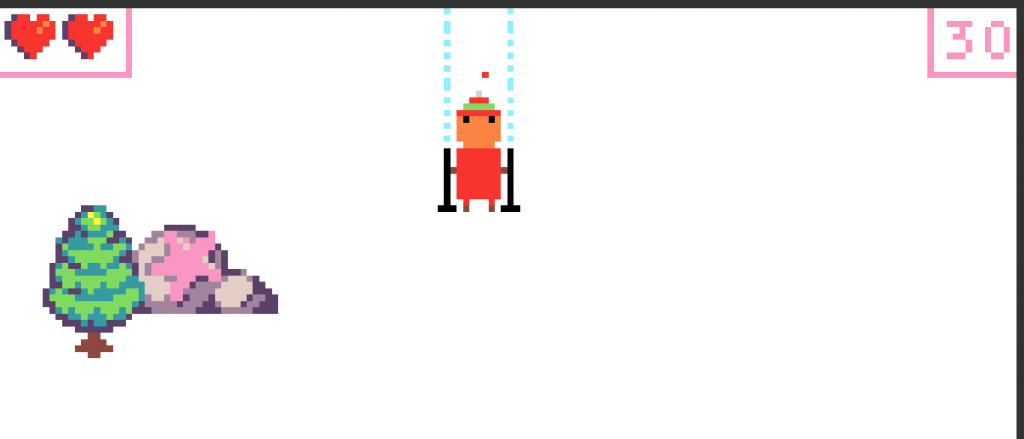
The skier stays near the top of the screen while the world moves toward them.

Goal:
Avoid obstacles for as long as possible.

This game uses a classic trick in game design:
If the environment moves, it feels like the player is moving.

The Big Idea

Even though it looks like the skier is racing downhill:

  • The skier only moves left and right
  • The obstacles move upward toward the skier
  • The player survives by dodging obstacles

Obstacles can include:

  • Flags
  • Rocks
  • Trees

Play our html version of the game.


Step 1: Create Your Skier (Player Sprite)

Start with your skier — this is your avatar.

Requirements:

  • Place the skier near the top of the screen
  • Allow the skier to move left and right

Tip #1: Player Movement

Think carefully about how the skier should move.

You might:

  • Use the left and right arrow keys
  • Make the skier move toward the mouse

There is no single correct solution — choose what feels best for your game.

Step 2: Add Your First Obstacle

Obstacles create the challenge.

Start simple:

  1. Create one obstacle
  2. Spawn it at the bottom of the screen
  3. Move it up the screen toward the skier
  4. When it goes off screen, reset it to the bottom

Tip #2: One Obstacle First

Do not add everything at once.

  • Get one obstacle working
  • Make sure it moves correctly
  • Then add more obstacle types

Step 3: Create the Downhill Illusion

The skier does not move downhill — the obstacles do.

Obstacle Rules:

  • Move at a constant speed
  • Only move on the Y-axis
  • No left or right movement

Tip #3: Keep the Physics Simple

Simple movement makes debugging easier.

  • No X movement
  • Only Y movement
  • Smooth, steady speed

This keeps the focus on gameplay, not complex math.


Step 4: The Game Loop

Every frame, your game should:

  1. Move the skier left or right
  2. Move obstacles upward
  3. Check for collisions
  4. Repeat

This loop continues until the skier hits an obstacle.

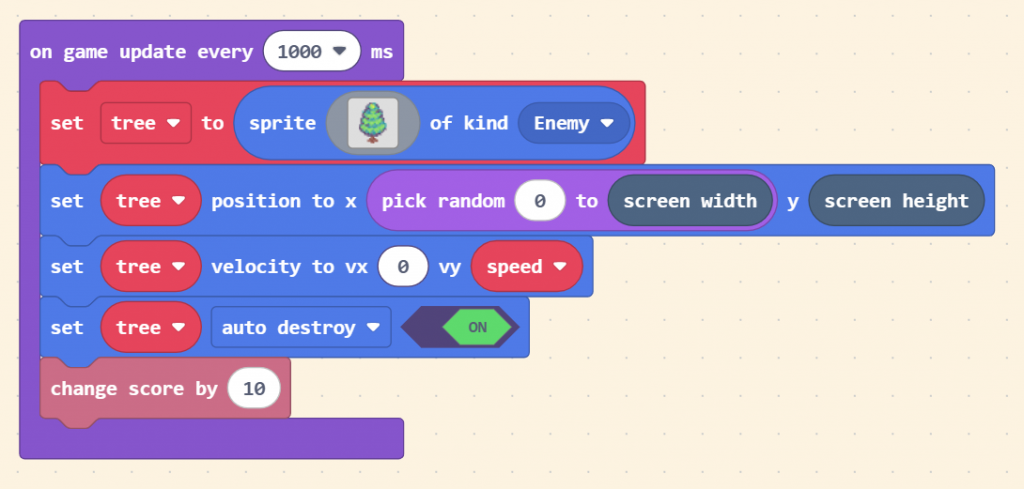
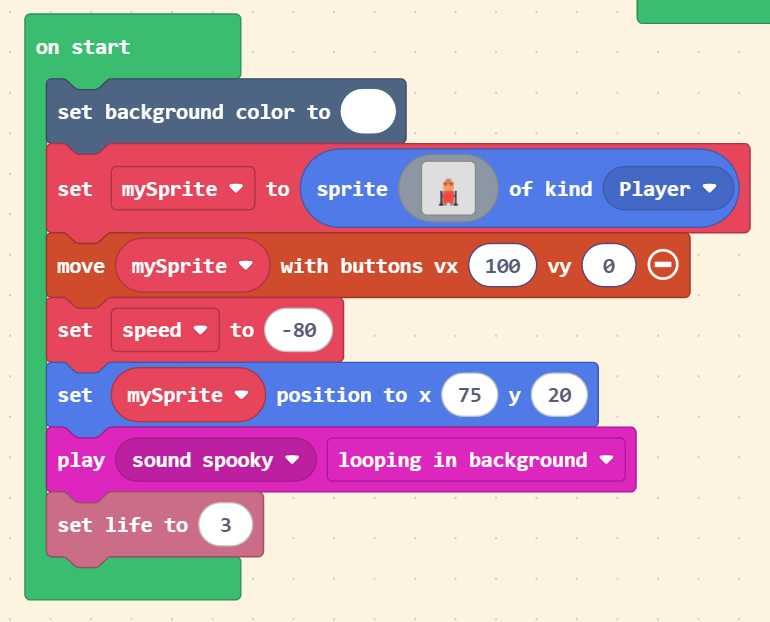
Check out our MakeCode Arcade Version of the Game!

Game Over

When the skier touches an obstacle:

  • End the game, or
  • Display a Game Over message

Extension Challenges (Optional)

Want to take your game further?

Try adding:

  • A score based on time survived
  • Faster obstacles over time
  • Sound effects
  • Multiple levels or difficulty modes

Final Thought

Start small. Test often.
Every great game begins with something simple.

Happy coding.
Sprattronics Learning Lab

Maximize your education!
Code a Mini Economy Town in Scratch

Development Guide: Code a Mini Economy Town in Scratch This guide explains how to build a dice-powered city simulator in Scratch. You will learn how to manage a virtual economy, use cloning to build a visual city, and create a multi-level progression system. You can check out this project on Scratch. Dicy City Scratch We […]

Read More
Code a Town Economy Game

Code a Mini Economy Town: A Development Guide This guide breaks down the creation of Dice City Tycoon, a browser-based economic simulator. We developed this game in five distinct phases, moving from a simple text-based engine to a polished, multi-level city builder. This page is all about building the game in HTML for a Web Browser. […]

Read More
Create a Downhill Skier Game

DOWNHILL SKIER GAME CODING CHALLENGE The Challenge Your mission is to create a downhill skiing game.The skier stays near the top of the screen while the world moves toward them. Goal:Avoid obstacles for as long as possible. This game uses a classic trick in game design:If the environment moves, it feels like the player is […]

Read More
Sarah E. Goode LEGO Folding Desk to Bed Build

Overview Design a LEGO build that transforms from a desk into a bed, inspired by Sarah E. Goode’s folding cabinet bed. This challenge highlights how engineers solve real problems—like limited living space—by creating furniture that serves multiple purposes. Watch the full build video: https://youtu.be/h9pIRXLIa8w Best for: Grades 2–6Kits: LEGO Spike Prime or Spike EssentialTime: 45–60 […]

Read More
Alexander Miles - LEGO Spike Automatic Door Build

Overview Build a LEGO robot that opens and closes a door automatically—no hands required. This challenge is inspired by Alexander Miles, the inventor whose automatic elevator door system made buildings safer and helped shape modern cities. Watch the full build video: https://youtu.be/CT-ELr0o-v0 Best for: Grades 2–6Kits: LEGO Spike Prime or Spike EssentialTime: 45–60 minutes Who […]

Read More
Garrett Morgan LEGO Traffic Signal Build

Build a working LEGO traffic signal inspired by Garrett Morgan, the inventor whose improved traffic light design helped make roads safer. In this challenge, students design a motorized signal system, learn why timing and clear communication matter, and connect history to real engineering decisions. Watch the Video! Click Here Who Was Garrett Morgan? Garrett Morgan […]

Read More
linkedin facebook pinterest youtube rss twitter instagram facebook-blank rss-blank linkedin-blank pinterest youtube twitter instagram